Replacement Remote Control Guide for Samsung 00017B
Quick reference guide for the Samsung 00017B replacement remote control, detailing button mapping and functional equivalents for original remote commands.
Quick guide from the manual
This document serves as a reference for the Samsung 00017B replacement remote control. It maps the functions of the original remote buttons to their corresponding buttons on the replacement unit to ensure full control over your device.
Button mapping and functions
The following list outlines the primary functions available on the replacement remote compared to the original layout:
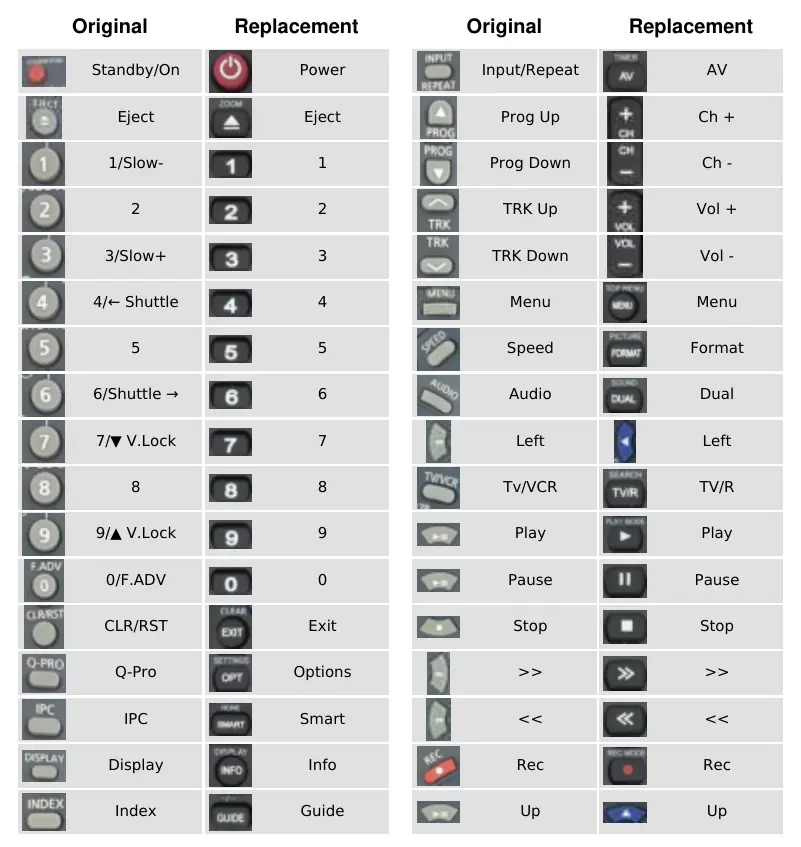
- Power: Standby/On
- Eject: Eject
- Numeric keys (0-9): Direct channel or track selection
- Exit: CLR/RST
- Options: Q-Pro
- Smart: IPC
- Info: Display
- Guide: Index
- AV: Input/Repeat
- Ch + / Ch -: Prog Up / Prog Down
- Vol + / Vol -: TRK Up / TRK Down
- Format: Speed
- Dual: Audio
- TV/R: Tv/VCR
- Navigation: Up, Down, Left, Right, and OK buttons function as labeled.
- Media controls: Play, Pause, Stop, Fast Forward (>>), Rewind (<<), and Record (Rec) operate as standard media playback controls.
Manufacturer information
Samsung Electronics
Practical help
Common problems
Refer to the mapping table in this guide to identify the correct replacement button for the desired original function (e.g., use 'Options' for 'Q-Pro').
Before use
- Ensure the replacement remote has fresh batteries installed.
- Verify the device is powered on and within range.
- Compare the button layout provided in this guide with your specific device requirements.

Manual page author
Emily Carter
User documentation editor
Prepares concise manual descriptions and highlights the most useful setup, operation, and maintenance information for readers.