Computers / Keyboards Input
Samsung S Pen (145X8MM) Active Stylus Pen
Comprehensive user guide for the Samsung S Pen (145X8MM), covering usage, tip replacement, and compatibility with Samsung Galaxy tablets.
Table of contents
Product Overview
The Samsung S Pen (Model: 145X8MM) is an active stylus designed for precision writing, drawing, and note-taking on compatible Samsung Galaxy tablets. The device features a fine 0.5mm point tip for high accuracy and includes a dedicated eraser button for quick corrections during use.
Getting Started
The S Pen is designed for immediate use. It requires no Bluetooth pairing or physical connection to the tablet. Simply pick up the stylus and begin interacting with your device screen directly. The pen does not require charging, making it ready for use at any time without the need for cables or power sources.
Technical Specifications
- Model: S Pen (145X8MM)
- Dimensions: 145 x 8 mm
- Tip Size: 0.5 mm
- Power: No charging required
Maintenance and Tip Replacement
To maintain optimal performance, the pen tip should be replaced if it becomes worn or damaged. Follow these steps to replace the nib:
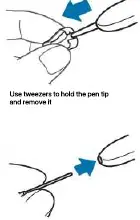
- Use a pair of tweezers to firmly grip the existing pen tip.
- Gently pull the tip straight out of the pen body.
- Insert a new, compatible nib into the pen tip opening, ensuring it is seated securely.
Compatibility
This S Pen is compatible with a wide range of Samsung Galaxy tablets, including:
- Samsung Galaxy Tab S6 and S6 Lite
- Samsung Galaxy Tab S7, S7+, and S7 FE
- Samsung Galaxy Tab S8, S8+, and S8 Ultra
- Samsung Galaxy Tab A8 and A9
Related manuals
Related manuals from the same brand or category.