Samsung S Pen Active Stylus User Guide
Quick guide for the Samsung S Pen active stylus. Learn how to use it, replace the nib, and check compatibility with your Samsung Galaxy Tab.
Table of contents
Quick Guide
The Samsung S Pen is designed for immediate use. It does not require any Bluetooth pairing or charging. Simply pick it up and start writing, drawing, or taking notes on your compatible Samsung Galaxy Tab.
Product Overview
The stylus features a fine point tip for precision and an eraser button for quick corrections. It is a passive-style active pen, meaning it does not contain an internal battery that needs to be charged.
Nib Replacement
If the pen tip becomes worn or damaged, it can be replaced:
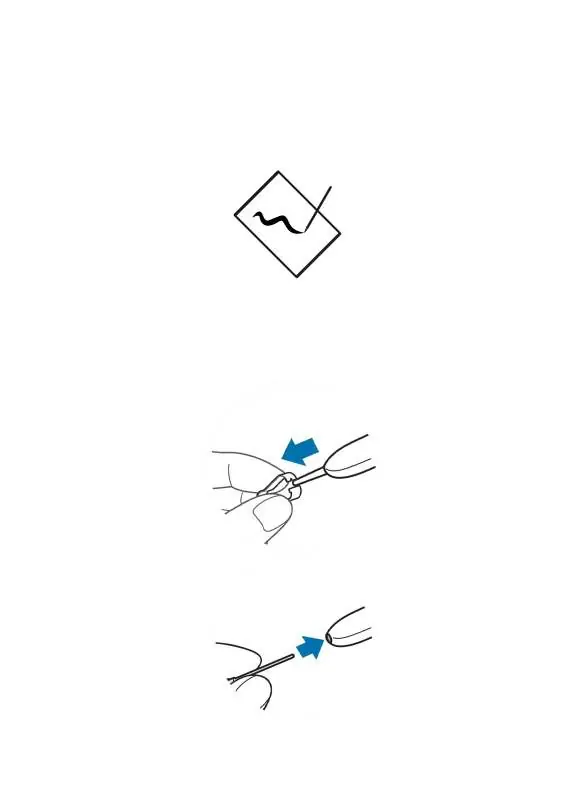
- Use a pair of tweezers to firmly grip the existing pen tip.
- Pull the tip straight out of the pen body.
- Insert the new nib into the pen until it is securely seated.
Specifications
- Model: S Pen
- Dimensions: 145 x 8 mm
- Tip Size: 0.5 mm
- Charging: Not required
Compatibility
This S Pen is compatible with the following Samsung Galaxy Tab models:
- Samsung Galaxy Tab S6, S6 Lite
- Samsung Galaxy Tab S7, S7+, S7
- Samsung Galaxy Tab S8, S8+, S8 Ultra
- Samsung Galaxy Tab A8, A9
Manufacturer information
Samsung Electronics
Practical help
Common problems
Ensure your tablet model is in the compatibility list and the nib is fully inserted.
Use tweezers to remove the old nib and insert a new one.
Before use
- Verify your tablet model is compatible
- Ensure the nib is securely inserted
- No charging or pairing is required

Manual page author
Emily Carter
User documentation editor
Prepares concise manual descriptions and highlights the most useful setup, operation, and maintenance information for readers.