Samsung Sound Tower Pre-Order & Launch Promotion Guide
Comprehensive guide on how to participate in the Samsung Sound Tower promotion, register your account, submit redemption claims, and track your free gift status.
Table of contents
Promotion Overview
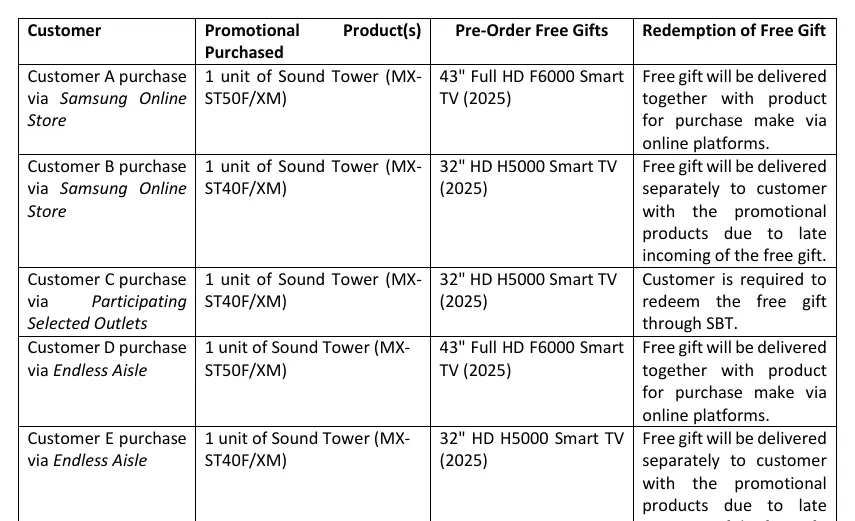
The Samsung Sound Tower Pre-Order and Launch Promotion allows eligible customers to receive promotional gifts upon purchasing specific Sound Tower models. The promotion is divided into two periods: the Pre-Order period and the Launch period, each with corresponding redemption windows.
Samsung Account Registration
To participate in the promotion, you must have a registered Samsung account. The redemption process is managed through the Samsung Sell-out Boosting Tool (SBT) portal. If you do not have an account, visit the official Samsung redemption portal to sign up. Ensure your account is activated via the email notification before attempting to submit a claim.
Redemption Process
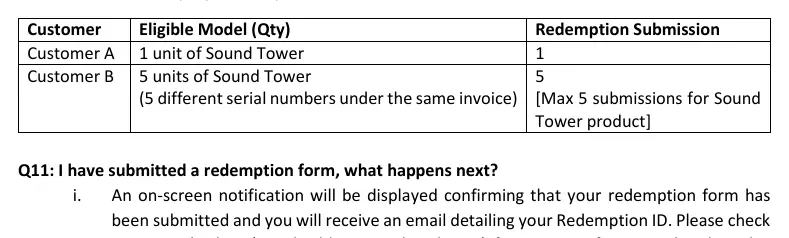
Depending on where you purchased your product, your free gift may be delivered automatically with your purchase or require manual redemption through the SBT portal. To submit a claim, you will need to provide:
- Email address and contact number
- Store of purchase and date
- Invoice number and proof of purchase
- Product serial number (found on the sticker inside the input area of the Sound Tower)
- Recipient details and delivery address
Important: All submissions must be completed within the designated redemption period. Ensure that your proof of purchase is clear and in a supported format (PDF, JPG, JPEG, or PNG) with a maximum size of 5MB.
Managing Your Claim
After submitting your form, you will receive a confirmation email with a Redemption ID. You can track the status of your claim by logging into the SBT portal and checking the Redemption History section. If your claim is rejected or placed on hold due to incomplete or illegible documentation, you must re-upload the correct documents or contact support within the specified timeframe to avoid losing your eligibility.
Support and Appeals
If you encounter issues or need to appeal a rejected claim, contact the support team via email at [email protected] or call the support hotline. Appeals for rejected claims must be made within 14 days after the relevant redemption period ends.