Sanag 105G Portable Bluetooth Speaker
Comprehensive user guide for the Sanag 105G portable Bluetooth speaker, covering operation, TWS pairing, technical specifications, and maintenance.
Table of contents
Product Overview
The Sanag 105G is a compact, portable Bluetooth speaker designed for high-quality audio playback. It features a versatile interface supporting Bluetooth connectivity, TF card playback, and radio functionality. The device is built with an IPX5 waterproof rating, making it suitable for various environments, though it should not be submerged in water.
Getting Started
To power the device on or off, press and hold the power button for 3 seconds. A short press allows you to cycle through available modes, including TF card, Radio, and Bluetooth. If the device becomes unresponsive, a long press of 10 seconds will trigger a reset. When the battery level is low, the speaker will emit a distinct triple-tone sound, indicating that it requires charging via the micro-USB port.
Operation and Controls
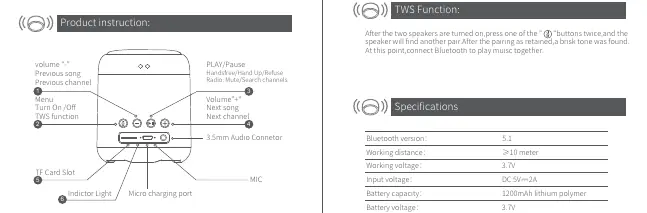
The speaker features intuitive controls for media management. Use the volume buttons to adjust sound levels or skip tracks. In radio mode, these buttons function as channel selectors. The play/pause button also serves as a hands-free control for phone calls; a short press answers or ends a call, while a long press rejects an incoming call. In radio mode, the play/pause button acts as a mute switch or a channel search trigger.
TWS Functionality
The 105G supports True Wireless Stereo (TWS) pairing, allowing you to connect two speakers for a synchronized stereo experience. To pair, turn on both speakers and press the designated TWS button twice on one of the units. Once a tone confirms the pairing, you can connect your Bluetooth device to enjoy audio through both speakers simultaneously.
Safety and Maintenance
Please note that the radio function is not applicable in Europe, Canada, or the United States. To maintain the longevity of your device, avoid exposure to extreme conditions and do not immerse the speaker in water despite its IPX5 rating. The device will automatically power off after 5 minutes if no Bluetooth connection is established to conserve battery life. Ensure the device is charged using a standard 5V/2A power source.
Practical help
Common problems
Perform a reset by holding the power button for 10 seconds.
The speaker will emit a 'Dong Dong Dong' sound; connect to a 5V/2A power source immediately.
Ensure the speaker is in Bluetooth mode (blue light flashing) and within 10 meters of the source device.
Before use
- Charge the device fully before first use.
- Ensure the micro-USB charging cable is properly inserted.
- Check that the Bluetooth source device is within 10 meters.
- Verify the TF card is formatted correctly if using for music playback (up to 32G).
Specs in practice
- Bluetooth 5.1
- The version of wireless technology used for stable, efficient connectivity.
- 1200mAh Battery
- The capacity of the internal lithium polymer battery providing power for playback.
Images and diagrams
- The top panel contains the volume/track controls and the power/mode button.
- The side interface includes the TF card slot, micro-USB charging port, and 3.5mm audio connector.
- The LED indicator provides status updates: flashing blue for Bluetooth mode, solid blue for connected, and red for charging.
Model compatibility
- Radio function is not supported in Europe, Canada, or the USA.
- TF cards are supported up to a maximum capacity of 32GB.

Manual page author
Emily Carter
User documentation editor
Prepares concise manual descriptions and highlights the most useful setup, operation, and maintenance information for readers.