Sandberg In Car Wireless Charger IR 10W User Guide
Quick guide for the Sandberg In Car Wireless Charger IR 10W (441-20). Learn how to mount the charger, connect power, and understand LED status indicators for charging.
Table of contents
Manual images
Click an image to enlargeQuick guide from the manual
This guide covers the installation and operation of the Sandberg In Car Wireless Charger IR 10W (model 441-20). Ensure you use a QC 3.0 compatible power source to achieve full charging speed.
Mounting
The charger can be installed in your vehicle using one of two included methods:
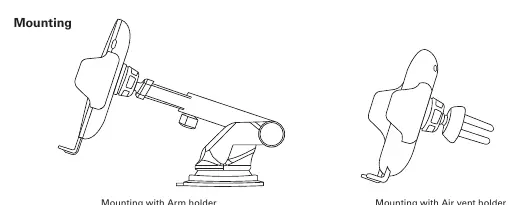
- Arm holder: Attach the arm mount to your dashboard or windshield.
- Air vent holder: Attach the clip to your vehicle's air vent.
Connection and Operation
Connect the charger to a power source using the provided cable. For optimal performance, a QC 3.0 compatible power source is required.
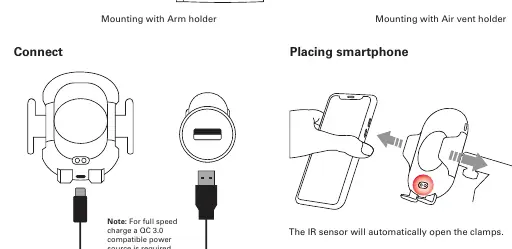
- Placing smartphone: The built-in IR sensor will automatically open the clamps when you bring your phone near.
- Charging: Once the phone is placed, the charger will automatically begin wireless charging.
- Removing smartphone: Simply remove the phone from the holder.
LED Indicators
The LED light on the charger indicates the current status:
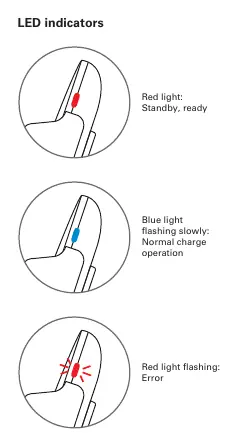
- Red light: Standby, ready for use.
- Blue light (flashing slowly): Normal charge operation.
- Red light (flashing): Error detected.
Manufacturer information
Sandberg A/S
Practical help
Common problems
Indicates an error. Ensure the phone is positioned correctly and the charger is receiving adequate power.
Before use
- Ensure you have a QC 3.0 compatible power source for full speed charging.
- Choose the appropriate mounting method (Arm or Air vent).
- Connect the USB cable to the power source.

Manual page author
David Miller
Documentation analyst
Organizes user manual content into clear summaries, with attention to model details, product context, and everyday usability.