User Manual for Sandberg Solar Charger 10W 2xUSB
Quick guide for the Sandberg Solar Charger 10W 2xUSB (420-69). Learn how to position the solar panel for optimal efficiency, charge devices directly, and use a powerbank for stable power in variable sunlight.
Table of contents
Manual images
Click an image to enlargeQuick guide from the manual
The Sandberg Solar Charger 10W 2xUSB is designed to provide portable power using solar energy. To ensure optimal performance, the solar panel must be positioned at the most direct angle towards the sun as possible. The device features two USB ports for charging your electronics.
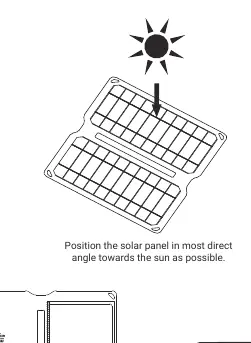
Charging devices
You can charge your devices using two primary methods depending on the available sunlight:
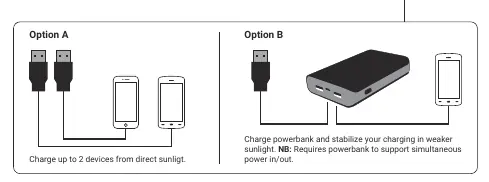
- Option A (Direct Charging): Connect up to 2 devices directly to the USB ports on the solar charger. This method works best in direct, strong sunlight.
- Option B (Powerbank Charging): If sunlight is weak or inconsistent, connect a powerbank to the charger. This helps stabilize the charging process. Note: The powerbank must support simultaneous power in/out functionality.
Support and Warranty
Sandberg provides a five-year warranty on this product. For support, technical assistance, or to register your product, visit the official helpdesk at http://helpdesk.sandberg.world or the warranty page at www.sandberg.world/warranty. For information regarding electronic waste disposal, please refer to www.sandberg.world/weee.
Official resources from the manual
Manufacturer information
Sandberg A/S
Practical help
Common problems
This often happens in weak or fluctuating sunlight. Use a powerbank (Option B) to stabilize the power delivery.
Ensure the solar panel is fully unfolded and angled directly towards the sun. Check that the USB cable is securely connected to both the charger and your device.
Before use
- Ensure the solar panel is completely unfolded.
- Position the panel at the most direct angle towards the sun.
- Verify that your USB cable is compatible with your device.
- If charging a powerbank, ensure it supports simultaneous power in/out.

Manual page author
Michael Turner
Technical manual editor
Reviews PDF manuals for structure, safety notes, and practical product details so readers can find the right information quickly.