User Manual for SanDisk G-RAID 2 Desktop Hard Drive
Quick start guide and setup instructions for the SanDisk G-RAID 2 Enterprise-Class 2-bay Desktop Hard Drive. Includes power specifications, operating conditions, and connection steps.
Quick answers from the manual
Quick answer
- To set up the SanDisk G-RAID 2, connect the power cable to the drive and a wall outlet, connect the data cable to your computer, and press the power button. p. 1
Key actions
- Connect power and data cables, then power on the device. p. 1
First start
- Connect power, connect data cable, press power button. p. 1
Technical specifications
| Parameter | Value | Meaning | Pages |
|---|---|---|---|
| Power | 19V 4.74A | Power input requirements | p. 1 |
Where to find it in the PDF
- Setup and Specifications p. 1
Table of contents
Quick guide from the manual
The SanDisk G-RAID 2 is an enterprise-class 2-bay desktop hard drive. Follow these steps to set up your device for the first time.
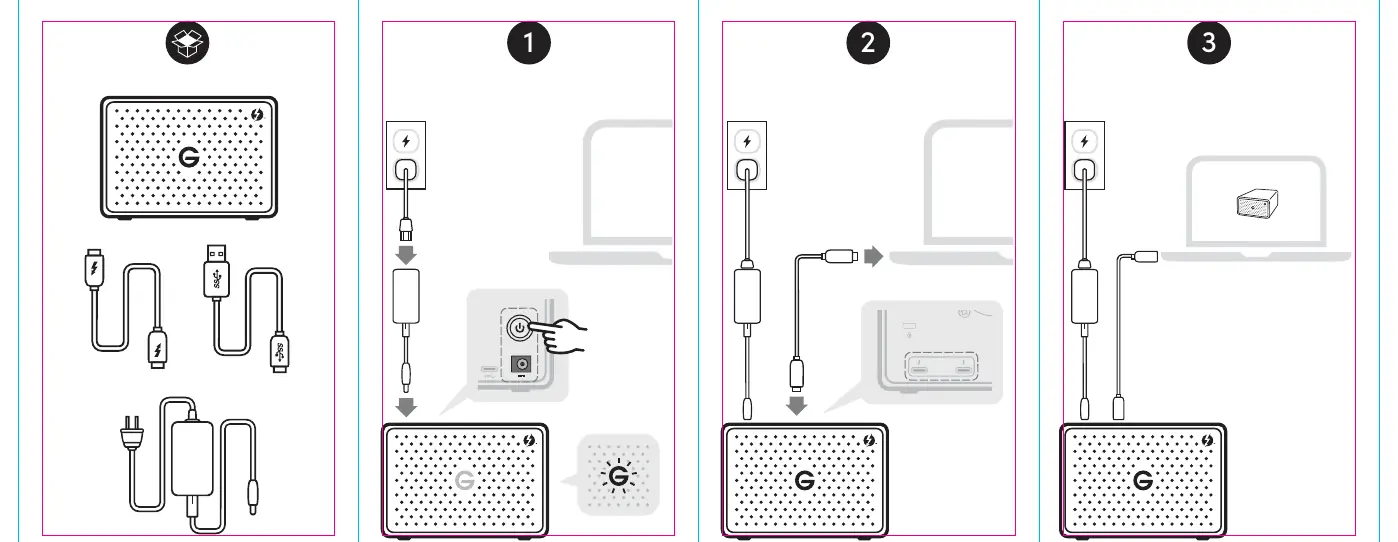
Setup Procedure
- Connect the power cable to the drive and a wall outlet.
- Connect the data cable to the drive and your computer.
- Press the power button to turn on the device.
Technical Specifications
- Power: 19V 4.74A
- Operating Temperature: 41°– 95°F (5°– 35°C)
- Operating Humidity: 5–80%
- Non-Operating Temperature: -4°– 148°F (-20°– 65°C)
- Non-Operating Humidity: 10–90%
Technical Support
For assistance, visit sandiskprofessional.com/support. You can also contact support via email or phone depending on your region as listed in the technical support section of the manual.
Official resources from the manual
Practical help
Before use
- Ensure you have the power cable
- Ensure you have the data cable
- Verify your computer has a compatible port
Specs in practice
- Operating Temp
- Keep the device between 5°C and 35°C for optimal performance

Manual page author
Michael Turner
Technical manual editor
Reviews PDF manuals for structure, safety notes, and practical product details so readers can find the right information quickly.