Hvac / Air Conditioners
Sauermann 110-RF KISTOCK Wireless Data Logger User Guide
Quick start guide for Sauermann KISTOCK wireless data loggers, including KP 110-RF, KT 110-RF, KT 150-RF, KTU 210-RF, KTR 310-RF, and KTT 310-RF models. Covers device activation, recording modes, mounting, and autozero procedures.
Table of contents
Manual images
Jump to the sectionQuick guide from the manual
This document provides essential setup and operational instructions for the KISTOCK wireless data logger series. The devices are shipped in an off state to preserve battery life. Users can configure recording modes, start/stop datasets, and perform maintenance tasks such as autozeroing (specific to KP 110-RF models).
Device Activation and Recorder Function
To activate the KISTOCK, press and hold the OK key for 5 seconds until the green LED blinks. To turn it off, press the Select and OK keys simultaneously for 5 seconds. Note that the device cannot be turned off during an active recording or data download.
Recording Modes and Operation
The device supports 5 recording modes: Immediate, Minimum, Maximum, Average, and Monitoring. It operates in two modes: Autonomous (wireless data download via Kilog RF software) and Network (data stored and sent to a computer at regular intervals). Datasets can be started via delayed start, software, or push-button, and stopped by date/time, period, predefined points, full memory, software command, or button press.
Autozero Procedure (KP 110-RF)
To perform an autozero during a measurement dataset:
- Disconnect the pressure tube from the instrument.
- Ensure keys are activated.
- Press the OK key for 5 seconds until 0 is displayed.
- Reconnect the pressure tubes to resume recording.
Mounting
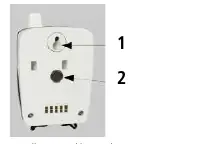
The KISTOCK can be installed using magnetic mounting, wall mounting, or an optional secured mounting bracket.
Maintenance and Safety
Avoid using aggressive solvents for cleaning. Protect the device from cleaning products containing formalin. Always use the device in accordance with its intended use and within the technical parameters specified to maintain its protection rating (IP65 for most models, IP54 for KTT 310-RF).
Manufacturer information
Sauermann
Practical help
Common problems
Device cannot be turned off
It is impossible to turn off the device during an active recording or data download.
Buttons are unresponsive
The keys may be deactivated. Press Select and OK simultaneously for 5 seconds to reactivate them; the green LED will flash twice.
Before use
- Ensure the device is activated by holding the OK key for 5 seconds.
- Verify the model-specific parameters (Pressure, Temperature, Current, etc.).
- Check the operating temperature range (5 to 50 °C for KP series; -40 to 70 °C for others).
- Ensure the device is protected from aggressive solvents and formalin.
- Confirm the battery type is 3.6 V lithium AA.
Specs in practice
- Monitoring Mode
- Records at different intervals based on whether readings are within or beyond setpoints.
Images and diagrams
- The display shows REC (recording), LOG (dataset status), and battery status.
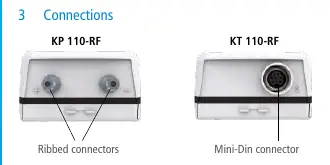
- The device features various connectors depending on the model, such as Ribbed, Mini-Din, or Thermocouple connectors.
- Mounting options include a wallmount eyelet and magnetic back.
Model compatibility
- Autonomous mode requires Kilog RF software for wireless data download.
- Network mode allows multiple Kistocks to be linked to a single computer.

Manual page author
Emily Carter
User documentation editor
Prepares concise manual descriptions and highlights the most useful setup, operation, and maintenance information for readers.