User Guide for SBS Portable Solar Charger 21W
Quick guide for the SBS Portable Solar Charger 21W. Learn about technical specifications, output capabilities, and optimal usage conditions for efficient solar charging.
Quick answers from the manual
Quick answer
- The SBS Portable Solar Charger 21W is a foldable solar panel device designed to charge USB-powered electronics using sunlight. It features two USB ports with a total output of 2x 5V/2.1A. p. 1, 2
Key actions
- Place the solar panels in direct sunlight for charging. p. 2
Problems and fixes
Check for shade or cloud cover; the device requires direct sunlight.
p. 2Show 2 more answers Show less
Technical specifications
| Parameter | Value | Meaning | Pages |
|---|---|---|---|
| Total Power | 21W | 3 x 7W panels | p. 2 |
| USB Output | 5V / 2.1A | Dual USB output | p. 2 |
Where to find it in the PDF
- Specifications and Usage p. 2
Table of contents
Quick guide from the manual
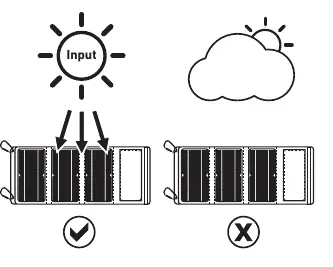
The SBS Portable Solar Charger 21W is designed for outdoor use. For optimal performance, ensure the solar panels are fully unfolded and exposed to direct sunlight. Avoid using the charger in cloudy or shaded conditions, as this will significantly reduce or stop the charging process.
Technical specifications
- Solar panel power: 3 x 7W (21W total)
- USB 1 Output: 5V D.C. - 2.1A
- USB 2 Output: 5V D.C. - 2.1A
- Total Output: 2 x 5V D.C. - 2.1A
- Material: Monocrystalline silicon and waterproof cloth
Usage instructions
To charge your device, connect it to one of the two USB ports located on the charger. Place the solar panels in an area with maximum sun exposure. The device is constructed from waterproof cloth, making it suitable for outdoor environments, but it relies entirely on direct sunlight to generate power.
Practical help
Common problems
Ensure the solar panels are placed in direct sunlight. Clouds or shade will prevent the charger from working effectively.
Before use
- Unfold all three solar panels.
- Ensure the panels are facing the sun directly.
- Connect your device using a USB cable to one of the two output ports.

Manual page author
Emily Carter
User documentation editor