User Guide for Seagate Game Drive for Xbox
Quick setup guide and safety instructions for the Seagate Game Drive for Xbox. Learn how to connect your drive to Xbox Series X/S and follow safe removal procedures to protect your data.
Quick answers from the manual
Quick answer
- Connect the Seagate Game Drive to the USB port on your Xbox Series X or Series S console. Always use the 'Safe Removal' option in the system settings before disconnecting to protect your data. p. 1
Key actions
- Connect the drive to the USB port. p. 1
- Perform safe removal before disconnecting. p. 1
Problems and fixes
Reorient/relocate antenna, increase separation, or connect to a different outlet.
p. 1Show 2 more answers Show less
Technical specifications
| Parameter | Value | Meaning | Pages |
|---|---|---|---|
| Rated Voltage | 5VDC | Operating voltage | p. 2 |
| Rated Current | 0.9A | Operating current | p. 2 |
Where to find it in the PDF
- Connection and Safety p. 1
- Regulatory and Technical Data p. 2
Table of contents
Manual images
Click an image to enlargeQuick Start Guide
The Seagate Game Drive for Xbox is designed for plug-and-play use with Xbox Series X and Xbox Series S consoles. To set up your drive:
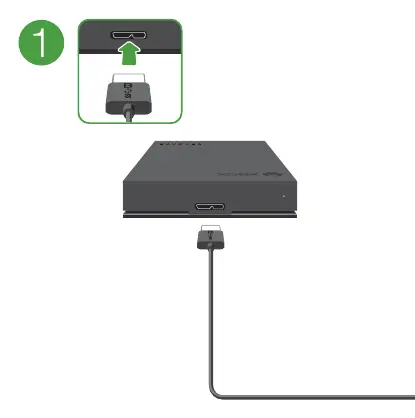
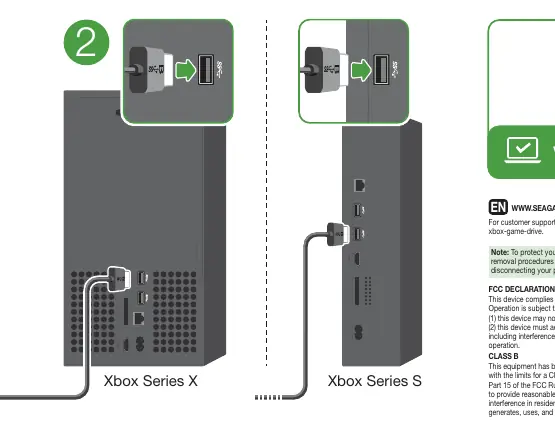
- Locate the USB port on your Xbox console.
- Connect the provided USB cable to the drive and the console's USB port.
- The console should automatically detect the drive.
Safe Removal
Important: To protect your data, always follow the safe removal procedures within your console's operating system before disconnecting the drive. Improper disconnection may lead to data loss or corruption.
Regulatory and Safety Information
This device complies with Part 15 of the FCC Rules. Operation is subject to the following conditions:
- This device may not cause harmful interference.
- This device must accept any interference received, including interference that may cause undesired operation.
This is a Class B digital device. If you experience interference with radio or television reception, try reorienting the receiving antenna, increasing the separation between the equipment and the receiver, or connecting the equipment to a different outlet.
Customer Support
For customer support, visit the official website at www.seagate.com/xbox-game-drive.
Official resources from the manual
Manufacturer information
Seagate Technology LLC
Practical help
Common problems
Always use the 'Safe Removal' procedure in the Xbox operating system before unplugging the drive.
Reorient or relocate the receiving antenna, increase separation between the equipment and receiver, or connect to a different circuit.
Before use
- Ensure the Xbox console is powered on.
- Locate the USB port on the back of the Xbox Series X or Series S.
- Connect the drive directly to the console using the provided cable.

Manual page author
David Miller
Documentation analyst