StarTech.com 10070H-ST SFP Transceiver Spec Sheet
Quick guide for the StarTech.com 10070H-ST SFP transceiver. Includes technical specifications, compatibility details, and installation overview.
Table of contents
Quick Guide
This document provides technical specifications and compatibility information for the StarTech.com 10070H-ST SFP transceiver. It is designed for use with Extreme Networks switches and routers, offering a reliable 1GbE connection over copper cabling.
Product Overview
The 10070H-ST is a copper SFP transceiver module compatible with Extreme Networks 10070H. It is designed, programmed, and tested to work with Extreme Networks brand switches and routers. The module supports hot-swapping, allowing for seamless upgrades and replacements with minimal network interruption.
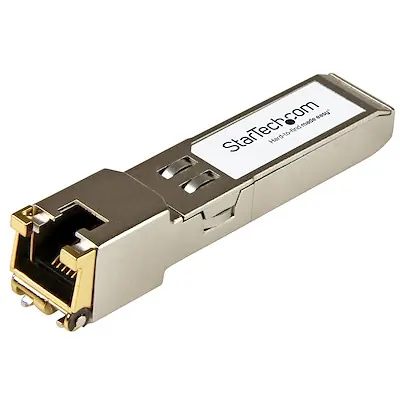
Technical Specifications
- Data Transfer Rate: 1Gbps (1.25 Gbps max)
- Connector Type: RJ-45
- Cable Type: Copper
- Maximum Distance: 100m
- MTBF: 510,469,759 hours
- DDM (Digital Diagnostics Monitoring): Supported
- Fiber Mode: Full Duplex
Compatibility
The 10070H-ST is compatible with Extreme Networks 10070H. Additionally, it is MSA-compliant and can be used with switches from various manufacturers that support unencoded modules, including:
- Ubiquiti
- D-Link
- Netgear
- Supermicro
- TP-Link
Installation and Usage
The module is hot-swappable. Ensure your network device is powered on and supports SFP modules. Insert the transceiver into the SFP slot until it clicks into place. Connect your RJ-45 copper network cable to the transceiver port.
Warranty Information
This product comes with a lifetime warranty.
Official resources from the manual
Practical help
Common problems
Ensure the SFP module is fully inserted into the SFP slot and the RJ-45 cable is securely connected.
Verify that your switch or router supports MSA-compliant or Extreme Networks 10070H-compatible modules.
Before use
- Verify the switch or router has an available SFP slot.
- Ensure the network cable is a compatible RJ-45 copper cable.
- Check if the device supports 1000BASE-T standards.

Manual page author
David Miller
Documentation analyst
Organizes user manual content into clear summaries, with attention to model details, product context, and everyday usability.