General / Accessories
Shenzhen 02PR0 Smart Glasses User Guide
Quick start guide for the Shenzhen 02PR0 smart glasses, covering Bluetooth pairing, multi-function button operations, and usage instructions.
Table of contents
Quick guide from the manual
This document provides essential instructions for operating the Shenzhen 02PR0 smart glasses. It covers the basic button controls for power management, media playback, and phone call handling, as well as the initial Bluetooth pairing process.
Device operation
The device is controlled via a single multi-function button located on the frame. The following operations are supported:
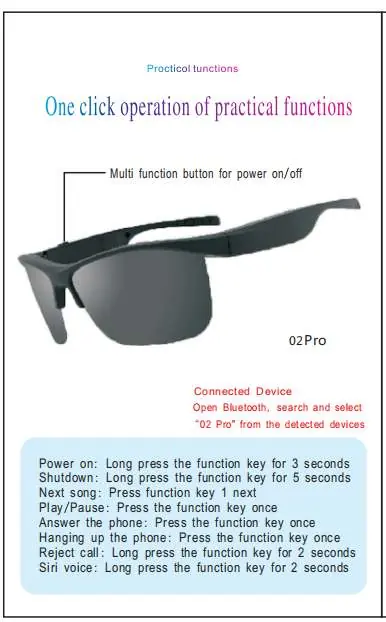
- Power on: Long press the function key for 3 seconds.
- Shutdown: Long press the function key for 5 seconds.
- Play/Pause: Press the function key once.
- Next song: Press the function key once.
- Answer the phone: Press the function key once.
- Hanging up the phone: Press the function key once.
- Reject call: Long press the function key for 2 seconds.
- Siri voice: Long press the function key for 2 seconds.
Bluetooth connection
To connect the glasses to your smartphone or other device:
- Open the Bluetooth settings on your mobile device.
- Search for available devices.
- Select 02 Pro from the list of detected devices to complete the pairing.
Safety and compliance
This device complies with Part 15 of the FCC Rules. It is designed to operate without causing harmful interference and must accept any interference received. The device has been evaluated to meet general RF exposure requirements and can be used in portable exposure conditions without restriction. Users are advised not to make unauthorized modifications to the unit, as this may void the authority to operate the equipment.
Practical help
Common problems
Device not connecting via Bluetooth
Ensure the device is powered on and in pairing mode, then search for '02 Pro' in your phone's Bluetooth settings.
Interference with radio or TV reception
Reorient or relocate the receiving antenna, increase separation between the equipment and receiver, or connect the device to a different circuit outlet.
Before use
- Ensure the device is fully charged.
- Verify that your smartphone's Bluetooth is enabled.
- Locate the multi-function button on the frame.
Images and diagrams
- The multi-function button is located on the temple of the glasses frame.
- The device is identified as '02 Pro' in Bluetooth device lists.
Model compatibility
- Compatible with standard Bluetooth-enabled devices.
- Complies with FCC Part 15 Class B digital device limits.

Manual page author
Michael Turner
Technical manual editor
Reviews PDF manuals for structure, safety notes, and practical product details so readers can find the right information quickly.