SIMATIC HMI TP 177A, TP 177B, OP 177B Operating Instructions
Comprehensive operating instructions for Siemens SIMATIC HMI TP 177A, TP 177B, and OP 177B panels, covering installation, configuration, operation, maintenance, and troubleshooting.
Table of contents
Product Overview
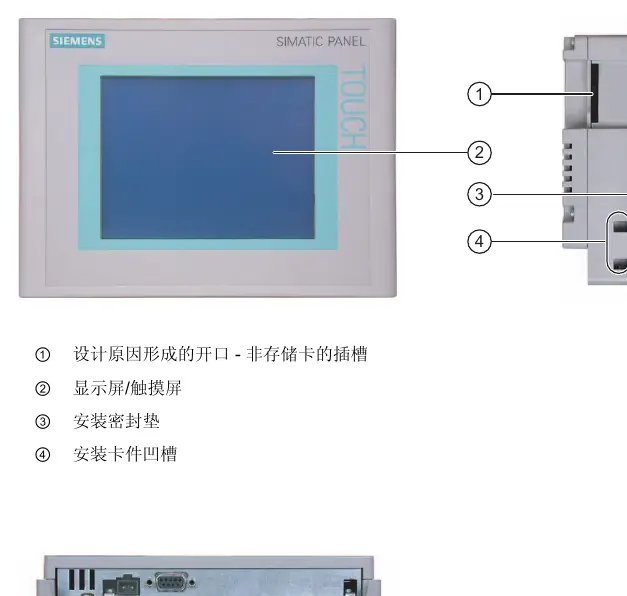
The SIMATIC HMI 177 series panels (TP 177A, TP 177B, OP 177B) are designed for HMI tasks in industrial environments, ranging from simple to medium complexity. These panels support various character sets and are optimized for WinCC flexible projects. The TP 177B 4" model features a 4.3" TFT widescreen display, while the OP 177B includes both a membrane keyboard and a touchscreen.
Safety Information
These devices are open-type equipment intended for installation in enclosures or cabinets. Only qualified personnel should perform installation and commissioning. Ensure proper grounding and adhere to all safety warnings, especially in hazardous areas (Zone 2/22), to prevent explosion risks or equipment damage.
Installation and Connection
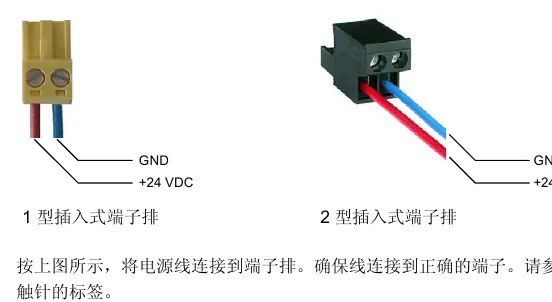
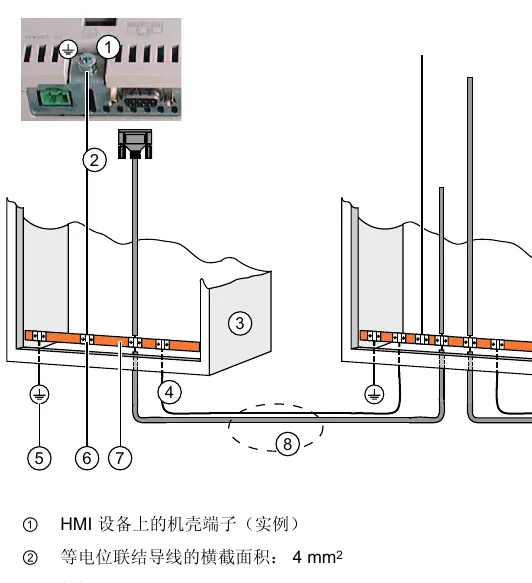
Proper installation is critical for maintaining the IP65/NEMA 4 protection rating. Ensure the device is installed in a fixed location protected from weather. Follow the specified mounting cut-out dimensions and ensure adequate ventilation. Connect the device according to the provided wiring diagrams, ensuring proper potential equalization and using shielded cables for communication interfaces.
Commissioning and Operation
Upon initial power-up, the device will enter 'Transfer' mode if no project is loaded. Use the loader to configure system settings, such as communication channels, date/time, and screen brightness. During operation, the touchscreen or function keys are used to interact with the project. Ensure the touchscreen is calibrated correctly to avoid parallax errors.
Maintenance and Troubleshooting
The panels are designed for maintenance-free operation. Clean the screen and keyboard membrane using only mild soap or screen cleaning foam; avoid abrasive cleaners or compressed air. If the device fails to operate, check the power supply, cable connections, and system alarms. For repairs, the device must be returned to the Siemens service center.
Disposal
Dispose of the device in accordance with local environmental regulations. Ensure that all components are handled properly to minimize environmental impact.

Manual page author
David Miller
Documentation analyst
Organizes user manual content into clear summaries, with attention to model details, product context, and everyday usability.