Installation Guide for Sigma 14224WH Outlet Box Cover
Step-by-step installation instructions for the Sigma 14224WH all-weather outlet box cover. Includes safety warnings, wiring requirements, and assembly procedures.
Table of contents
Important Safety Information
Warning: Improper wiring of any electrical device can cause serious injury or death. This product must be installed by a certified electrician or other qualified person in accordance with the National Electrical Code and all applicable local codes and standards.
Always turn off power before installing.
Installation Instructions
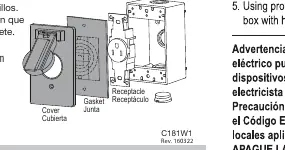
- Wire the device according to the manufacturer's instructions.
- Mount the device to the outlet box according to the manufacturer's instructions.
- Close any holes in the outlet box according to the manufacturer's instructions.
- Remove tear-outs from the gasket as required to fit the appropriate device.
- Using the provided screws, mount the gasket and cover to the outlet box with the hinges at the top.
Package Contents
The package includes the outlet box cover, gasket, and screws. Items that are shaded in the product diagram are included in the package.
Practical help
Common problems
Ensure installation is performed by a certified electrician and follows all local codes and the National Electrical Code.
Remove tear-outs from the gasket as required to fit the specific device being installed.
Before use
- Ensure power is turned off at the source before beginning installation.
- Verify the device is a 15/20 Amp receptacle.
- Ensure all holes in the outlet box are closed.
- Prepare the gasket by removing necessary tear-outs.
- Confirm the cover is oriented with hinges at the top.

Manual page author
Emily Carter
User documentation editor
Prepares concise manual descriptions and highlights the most useful setup, operation, and maintenance information for readers.