Operating Instructions for SKC AirLite Sample Pump 110-100-T
Comprehensive operating instructions for the SKC AirLite Sample Pump (110-100-T), covering setup, calibration for high and low flow applications, battery replacement, and maintenance.
Table of contents
Manual images
Jump to the sectionProduct Overview
The SKC AirLite Sample Pump (Cat. No. 110-100-T) is a portable air sampling pump designed for abatement, indoor air sampling, and emergency response in non-hazardous locations. It provides flow rates ranging from 5 to 3000 ml/min. The unit is powered by three standard AA alkaline batteries.

Getting Started
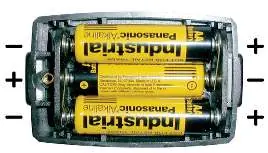
To install or replace batteries, use a slotted screwdriver to loosen the screw on the bottom of the pump, remove the compartment door, and insert three new AA alkaline batteries, ensuring correct polarity. Secure the door by tightening the screw. For maximum run time, use fresh batteries before each sampling period. If using rechargeable 1.2-volt NiMH batteries, expect approximately half the run time of disposable alkaline batteries.
Operation
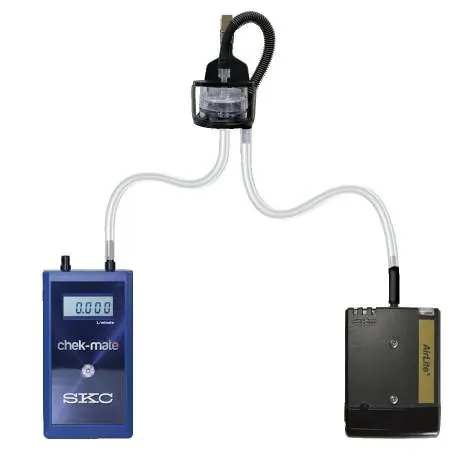
The pump requires a 5-minute warm-up period before calibration. Calibration must be performed using a representative sample medium and a calibrator. For high flow applications (1000 to 3000 ml/min), connect the calibrator to the pump inlet and adjust the flow using the flow adjustment screw on top of the unit. For low flow applications (5 to 500 ml/min), specific accessories such as the All-in-One Adjustable Tube Holder or a Constant Pressure Controller (CPC) are required. Always calibrate flow rates before and after each sampling session.


Sampling Procedures
During sampling, the pump's LCD displays the elapsed run time. If the pump encounters excessive back pressure or low battery, it will shut down and display a fault icon. In the event of a flow fault, the pump will attempt to restart up to five times. To manually restart after a fault, correct the blockage and press the on/off button twice. After sampling, verify the post-sample flow rate without adjusting the pump settings and compare it to the pre-sample rate.
Maintenance and Safety
Do not operate the pump in hazardous or explosive locations as it is not intrinsically safe. Periodically inspect the inlet ports on the CPC for blockages, especially in dusty environments, and clean them with a small pick if necessary. Remove batteries if the pump will not be used for an extended period to prevent terminal corrosion. For service, contact SKC Inc. at 800-752-8472 (U.S. only) or 724-941-9701.
Practical help
Common problems
Check for blockages in the sampling train or CPC inlet ports. Correct the blockage and press the on/off button twice to restart.
The battery voltage is low. Replace with new AA alkaline batteries before continuing sampling.
Compare pre and post-sample flow rates. If they differ by more than ± 5%, note this in your sampling documentation.
Before use
- Ensure three fresh AA alkaline batteries are installed.
- Run the pump for 5 minutes to allow for equilibration.
- Verify that the required sampling accessories (e.g., CPC, tube holders) are available.
- Ensure 1/4-inch ID tubing is used for connections.
- Calibrate the flow rate using a representative sample medium.
Specs in practice
- Operating Temperature
- 32 to 104 F (0 to 40 C); allow the pump to equilibrate if moved between temperature extremes.
- Intrinsic Safety
- Not intrinsically safe; do not use in hazardous or explosive locations.
Images and diagrams
- Figure 1: Identifies pump components including the inlet, battery compartment, flow adjustment screw, and LCD.
- Figure 3/4: Shows the calibration train setup for multiple tubes using a CPC and Quad Adjustable Low Flow Tube Holder.
- Figure 5: Illustrates the cut-away view of the flow adjustment mechanism on the tube holder.
Model compatibility
- Low flow sampling (5-500 ml/min) requires additional accessories like the All-in-One Adjustable Tube Holder or CPC.
- Rechargeable NiMH batteries provide approximately 50% of the run time of disposable alkaline batteries.

Manual page author
Emily Carter
User documentation editor
Prepares concise manual descriptions and highlights the most useful setup, operation, and maintenance information for readers.