Health / Massage Devices
SKG E7 Eye Massager User Manual
Quick guide for the SKG E7 Eye Massager. Learn how to operate the device, connect via Bluetooth, understand massage modes, and follow safety and maintenance instructions.
Quick answers from the manual
Quick answer
- The SKG E7 Eye Massager is operated via the power key for mode selection and power control. It supports Bluetooth connectivity for music playback and requires a 5V charger for maintenance. p. 1
Key actions
- Powering on/off p. 1
- Bluetooth pairing p. 1
First start
- Adjust the elastic band and remove contact lenses/makeup before the first use. p. 1
Problems and fixes
Device not connecting to Bluetooth
Ensure the device is powered on and discoverable as 'S1511HB'.
p. 1Maintenance and reset
- Clean with a soft, clean cloth dipped in a little water. Do not rinse in water. p. 1
Technical specifications
| Parameter | Value | Meaning | Pages |
|---|---|---|---|
| Model | S1511HB | Product identification code. | p. 1 |
| Input | 5V | Required charging voltage. | p. 1 |
Where to find it in the PDF
- Product Overview and Operation p. 1
Table of contents
Quick Guide
The SKG E7 Eye Massager is designed to provide relaxation through vibration and heat. Before use, ensure the elastic band is adjusted for a comfortable fit. The device features multiple massage modes and Bluetooth connectivity for audio playback. Always remove contact lenses and makeup before use.
Product Diagram
The device consists of the following key components:
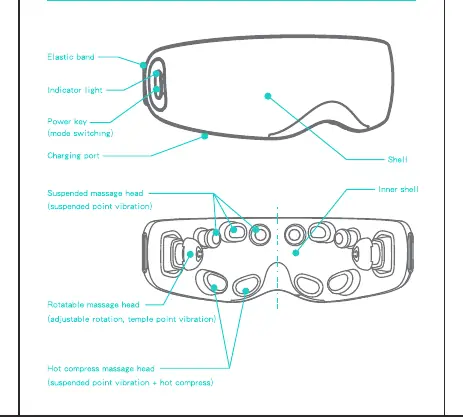
- Elastic band: Adjustable strap for fit.
- Indicator light: Shows device status.
- Power key: Used for switching modes and power control.
- Charging port: For battery recharging.
- Massage heads: Includes suspended massage heads, rotatable massage heads, and a hot compress massage head.
Operation Guidance
Follow these steps to operate your massager:
- Power On/Off: Long press the power key for about 2 seconds to turn the device on or off.
- Modes: After powering on, short press the power key to cycle through the four vibration modes.
- Bluetooth: When the device is powered on, it will be discoverable as 'S1511HB'. Pair your phone to play music. The device will announce 'Bluetooth connected' upon successful pairing.
- Low Battery: If the battery is low, the indicator light will flash, and the device will shut down automatically.
Basic Product Parameters
- Device Name: E7-EN
- Model: S1511HB
- Rated Input Voltage: 5V
- Rated Input Power: 5W
- Battery Capacity: 1500mAh
Daily Maintenance
- Clean the device with a soft, clean cloth dipped in a little water.
- Do not use volatile liquids like alcohol.
- The device cannot be disassembled or rinsed in water.
- Keep the device dry and store it properly.
Safety and Precautions
Please adhere to the following safety guidelines:
- Do not use if you have eye diseases such as glaucoma, cataract, or retinal detachment.
- Do not use if you have undergone eye surgery or have heart disease.
- Remove contact lenses and makeup before use.
- Do not use while driving.
- Keep out of reach of children.
- Do not use in high-temperature or high-humidity environments.
Practical help
Common problems
Bluetooth connection failure
Ensure the device is powered on and in pairing mode. Check if your phone has discovered 'S1511HB'.
Device shuts down unexpectedly
The battery may be low. Charge the device using a standard 5V charger.
Before use
- Adjust the elastic band for a comfortable fit.
- Remove contact lenses.
- Remove all makeup.
- Ensure the device is charged.
- Do not use if you have eye conditions like glaucoma or have had eye surgery.
Specs in practice
- Rated Input Voltage: 5V
- Use a standard 5V charger to avoid damaging the battery.
- Battery Capacity: 1500mAh
- Provides power for the vibration and heating functions.
Images and diagrams
- The power key is located on the side of the device for easy access during use.
- The charging port is positioned to allow charging while the device is not in use.
Model compatibility
- Compatible with devices supporting Bluetooth audio.
- Requires a 5V charger for optimal battery health.

Manual page author
Michael Turner
Technical manual editor
Reviews PDF manuals for structure, safety notes, and practical product details so readers can find the right information quickly.