Electronics / Monitors
Skmei 0841 Watch Instruction Manual
Comprehensive user guide for the Skmei 0841 digital watch, covering time setting, alarm configuration, chronograph functions, and chime settings.
Table of contents
Product Overview
The Skmei 0841 is a versatile digital watch designed for daily use, featuring a clear display that shows the day of the week, hour, minute, and second. The watch is equipped with multiple modes, including a chronograph, alarm, and time setting mode, all easily accessible via the side buttons. Users can toggle between 12-hour and 24-hour formats to suit their preference, and a backlight is available for visibility in low-light conditions.
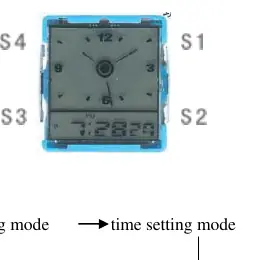
Watch Modes and Navigation
Navigating the Skmei 0841 is straightforward. By tapping the S3 button in the normal display mode, you can cycle through the different modes: chronograph, alarm setting, and time setting. The watch also features a dedicated S4 button for clock adjustment. Understanding the button layout is essential for efficient operation, as each button serves specific functions depending on the active mode.
Chronograph Functions
To use the stopwatch feature, enter the chronograph mode by tapping the S3 button once from the normal display. Use the S1 button to start and stop the timer. While the chronograph is running, you can tap the S2 button to record lap times or read the current elapsed time. To reset the chronograph, ensure it is stopped and use the S2 button.
Setting Time and Date
To adjust the time and date, tap the S3 button three times from the normal display mode until the seconds start flashing. Use the S2 button to toggle between seconds, minutes, hours, date, month, and day of the week. For each setting, use the S1 button to advance the value. When setting the hour, pay close attention to the AM/PM indicator or the H symbol, which denotes the 24-hour format. Once all settings are correct, tap S3 to save and exit.
Alarm and Chime Settings
The alarm can be configured by tapping the S3 button twice from the normal display. Adjust the hours and minutes using the S1 and S2 buttons, ensuring the correct AM/PM setting is selected. To toggle the alarm on or off, hold the S1 and S2 buttons simultaneously in normal display mode; the appearance or disappearance of the alarm icon confirms the status. Similarly, the hourly chime can be enabled or disabled by holding the S2 button and tapping the S3 button. When the week icons are visible, the chime is active.
Manufacturer information
Guangdong SKMEI Watch Manufacturing Co., Ltd.
Practical help
Common problems
Alarm is not sounding
Ensure the alarm icon is visible on the display by holding S1 and S2 in normal mode.
Hourly chime is not working
Hold S2 and tap S3 in normal mode to ensure all week icons are displayed, indicating the chime is ON.
Before use
- Identify the S1, S2, S3, and S4 buttons on the watch case.
- Check if the watch is in 12-hour or 24-hour format.
- Verify the current day of the week and date settings.
- Ensure the alarm is set to the correct AM/PM time.
Specs in practice
- 12/24-hour format
- Allows the user to choose between a standard 12-hour clock with AM/PM or a 24-hour military-style clock.
Images and diagrams
- The diagram illustrates the watch face with four buttons labeled S1, S2, S3, and S4.
- S1 is typically used for starting/stopping functions and activating the backlight.
- S2 is used for reading/resetting times and cycling through setting fields.
- S3 is the primary mode selection button.
- S4 is dedicated to clock adjustment.
Model compatibility
- The watch supports standard timekeeping, alarm, and stopwatch functions.

Manual page author
David Miller
Documentation analyst
Organizes user manual content into clear summaries, with attention to model details, product context, and everyday usability.