Electronics / Monitors
Skmei 0890C Binary LED Watch User Manual
Comprehensive user guide for the Skmei 0890C binary LED watch, covering time setting, date display, and operation instructions.
Table of contents
Product Overview
The Skmei 0890C is a unique binary LED watch designed to display time and date using a series of illuminated indicators. Unlike traditional analog or digital watches, this model uses a binary-coded system to represent hours, minutes, months, and dates. The watch features a sleek design and a 12-hour display format, making it a stylish accessory for those who appreciate modern, minimalist aesthetics.
Key Functions and Display
The watch operates using two primary buttons: MODE and SET. To view the current time, press the MODE key once. To view the month and date, press the MODE key twice. The watch is equipped with an intelligent power-saving feature; if no buttons are pressed for 6 seconds, the LED display will automatically turn off to conserve battery life.
Understanding the Binary Display
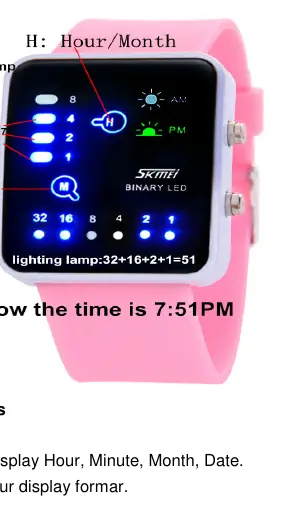
The watch face is divided into sections for hours, minutes, months, and dates. The indicators light up to represent specific values. For example, in the minute section, the lights correspond to values of 32, 16, 8, 4, 2, and 1. By adding the values of the illuminated lights, you can determine the exact time or date. When both the AM and PM indicators are lit simultaneously, the watch is in month/date display mode. When only one of these indicators is lit, the watch is displaying the current hour and minute.
Setting the Time and Date
To adjust the time, ensure the LED display is off. Press the MODE key once, then hold the SET key for 3 seconds to enter the time setting mode. The hour indicator will begin to flash. Press the MODE key to cycle through the hours until you reach the desired value. Press the SET key again to confirm the hour and switch to the minute setting. The minute indicator will flash; use the MODE key to adjust the minutes. Follow a similar process to set the month and date: press the MODE key twice while the display is off, then hold the SET key for 3 seconds. Adjust the month and date using the MODE key, confirming each selection with the SET key.
Manufacturer information
Guangdong SKMEI Watch Manufacturing Co., Ltd.
Practical help
Common problems
Display turns off too quickly
This is a power-saving feature. The display turns off automatically after 6 seconds of inactivity.
Cannot enter setting mode
Ensure the LED display is completely off before pressing the MODE key to initiate the setting sequence.
Before use
- Ensure the watch is in LED off mode before starting settings
- Familiarize yourself with the binary addition method for reading the lights
- Verify the current time and date before beginning the adjustment process
Specs in practice
- 12 Hour Format
- The watch displays time in a 12-hour cycle, indicated by AM or PM lights.
Images and diagrams
- The watch face uses specific columns for H (Hour/Month) and M (Minute/Date).
- Values are calculated by adding the numbers associated with the lit LEDs (e.g., 32+16+2+1=51).

Manual page author
Michael Turner
Technical manual editor
Reviews PDF manuals for structure, safety notes, and practical product details so readers can find the right information quickly.