SKYDANCE 150W 0/1-10V LED Driver - CV LN Series (LN-150-12-AS)
Professional 150W constant voltage LED driver with 0/1-10V and Push dimming capabilities, featuring high efficiency, flicker-free performance, and robust safety protections for indoor lighting applications.
Table of contents
Product Overview
The Skydance 150W LED driver (LN-150-12-AS) is a high-performance constant voltage power supply designed for indoor LED lighting. It supports multiple dimming methods, including 0-10V, 1-10V, 10V PWM, and Push switch, offering a smooth dimming range from 0.1% to 100%. The unit features an active PFC design with a power factor greater than 0.95 and high conversion efficiency of 91%.
Technical Specifications
- Output Power: 150W
- Output Voltage: 12V DC
- Input Voltage: 220-240V AC
- Dimming Range: 0.1-100%
- Efficiency: 91%
- Ingress Protection: IP20 (indoor use)
- Operating Temperature: -20°C to 45°C
- Lifetime: 50,000 hours at Tc 85°C
Safety and Protection
The driver is designed with Class II insulation and includes multiple built-in protection functions to ensure reliable operation. It features automatic recovery for over-temperature (when PCB temperature exceeds 100°C) and short-circuit conditions. The device is compliant with major international standards including ENEC, TUV, CB, CE, RoHS, and UKCA.
Installation and Wiring
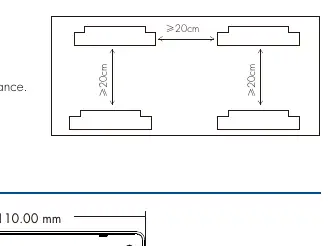
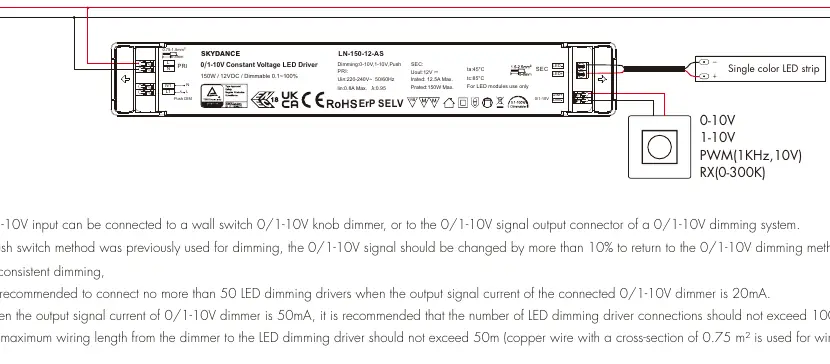
Installation must be performed by a qualified professional. The driver supports two primary wiring configurations: 0/1-10V dimming or AC Push switch dimming. It is not recommended to use both methods simultaneously. The input uses press-type terminals for 0.75-1.5mm² wires, while the output uses screw terminals for 1.5-2.5mm² wires. Ensure proper heat dissipation by maintaining at least 20cm of space between units.
Maintenance and Troubleshooting
The device does not support hot plug-in; if a load is connected, the driver must be restarted via the dimming interface or power cycle. The unit is non-waterproof and should be installed in a dry, acid-free, and oil-free environment. If a fault occurs, do not attempt to repair the device yourself. Contact the manufacturer for support.