SmallRig FilMov 17mm Threaded Lens Mount Plate
Quick guide for the SmallRig FilMov 17mm Threaded Lens Mount Plate. Learn how to install the mount on your compatible iPhone 16 Pro or Pro Max case and view product specifications.
Quick answers from the manual
Quick answer
- The SmallRig FilMov 17mm Threaded Lens Mount Plate is an accessory designed to attach 17mm threaded lenses to specific SmallRig iPhone 16 Pro/Pro Max cases. p. 1, 2
Key actions
- Install the mount plate by sliding it into the backplate of the compatible phone case with the circular groove facing up. p. 2
Technical specifications
| Parameter | Value | Meaning | Pages |
|---|---|---|---|
| Weight | 6.2g | Product weight | p. 3 |
| Dimensions | 44.9 x 43.6 x 5.4mm | Phone Case Dimensions | p. 3 |
Where to find it in the PDF
- Installation p. 2
- Specifications p. 3
Table of contents
Quick guide from the manual
This document provides installation instructions for the SmallRig FilMov 17mm Threaded Lens Mount Plate. Please ensure you are using a compatible SmallRig FilMov iPhone 16 Pro or 16 Pro Max case before attempting installation.
Product Installation
To install the lens mount plate:
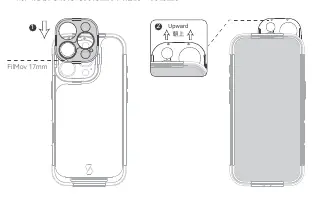
- Locate the backplate on your compatible SmallRig phone case.
- Slide the lens mount plate into the backplate.
- Ensure the side with the circular groove is facing up during installation.
Specifications
- Dimensions: 44.9 x 43.6 x 5.4mm
- Weight: 6.2g
- Material: Aluminum Alloy
Safety Notes
Do not subject the product to severe collisions or impacts to prevent damage.
Manufacturer information
SmallRig
Practical help
Common problems
Ensure you are using a compatible SmallRig FilMov iPhone 16 Pro or 16 Pro Max case.
Before use
- Verify you have a compatible SmallRig FilMov iPhone 16 Pro or 16 Pro Max case.
- Ensure the lens mount plate is clean.
- Check the orientation: the circular groove must face up when sliding into the backplate.

Manual page author
David Miller
Documentation analyst
Organizes user manual content into clear summaries, with attention to model details, product context, and everyday usability.