Lighting / Decorative Lighting
Solight 1T09 Alcohol Tester User Guide
Comprehensive user guide for the Solight 1T09 Alcohol Tester. Learn how to operate the device, perform breath tests, adjust measurement units, manage memory records, and maintain the sensor for accurate results.
Quick answers from the manual
Quick answer
- To perform a breath test, turn on the device, wait for the 'Please Blow' prompt, and blow continuously into the mouthpiece for 5-6 seconds until you hear a double beep. p. 1, 2
Key actions
- Turn on the device p. 1
- Change measurement units p. 2
First start
- Charge the device via USB before first use. p. 1
Problems and fixes
Flow error!
Blowing time too short or airflow too weak. Repeat the test.
p. 2Maintenance and reset
- Calibration is required every 12 months or after 500 measurements. p. 1
Technical specifications
| Parameter | Value | Meaning | Pages |
|---|---|---|---|
| Sensor type | Electrochemical (Fuel Cell Sensor) | Sensor technology | p. 1 |
| Measurement range | 0 - 5 ‰ BAC | Range of detection | p. 1 |
Where to find it in the PDF
- Technical Parameters and Start-up p. 1
- Measurement and Settings p. 2
Table of contents
Manual images
Click an image to enlargeQuick Guide
The Solight 1T09 is a portable alcohol tester with an electrochemical sensor. To perform a test, turn on the device by holding the power button for 2 seconds. Wait for the device to clean the sensor and display "Please Blow". Blow continuously into the mouthpiece for 5-6 seconds until you hear a double beep. The result will be displayed on the OLED screen.
Description of Facilities
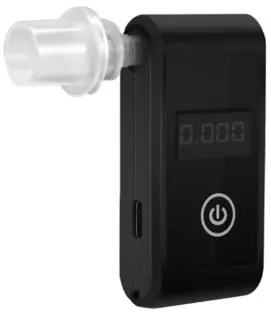
- Mouthpiece: Replaceable part for breath sampling.
- USB input: For charging the device (5V).
- Display: OLED screen showing test results and status.
- On/Off (Power): Button for power control and menu navigation.
- Charging indicator: Red indicates charging, green indicates fully charged, flashing indicates low battery.
Breath Alcohol Measurement
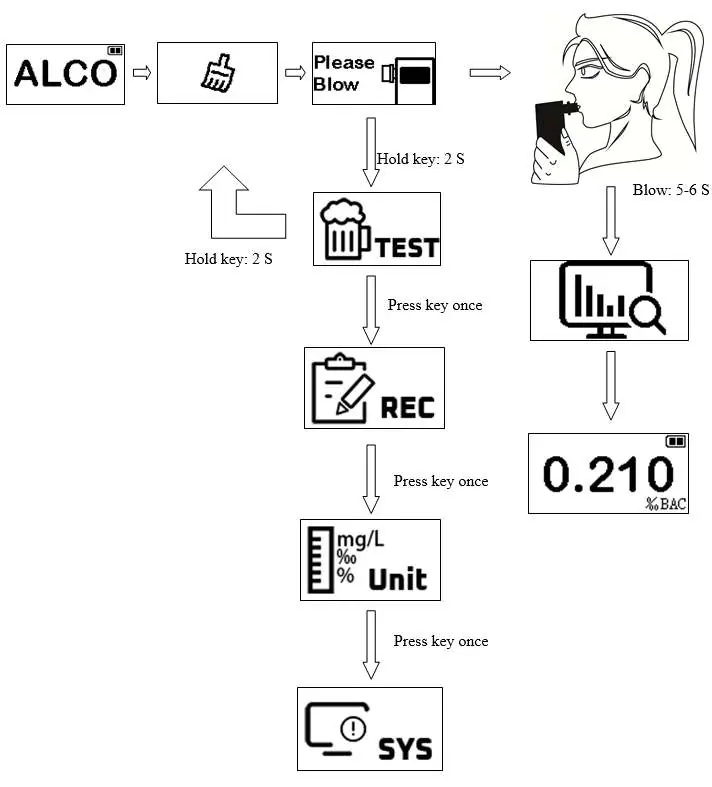
- Switch on the device; the display shows "ALCO" and the sensor activates.
- Wait for the "Please Blow" prompt.
- Blow continuously into the mouthpiece for 5-6 seconds. The device detects breath and emits a rapid beeping sound.
- Stop blowing when you hear "Beep! Beep!".
- The "analyzing" icon will flash, followed by the measurement result.
- If the test is interrupted or airflow is too weak, the display will show "Flow error!".
Units of Measurement and Warning Level Settings
You can customize the measurement units and warning thresholds:
- Units: Enter the "UNIT" menu. The unit icon will flash. Press the button to cycle between ‰ BAC, % BAC, and mg/L. Hold the button for 2 seconds to save.
- Warning Level: After setting units, the warning level value will flash. Press the button to adjust the threshold (e.g., 0.10, 0.20, 0.30, 0.40, 0.50 ‰ BAC). Hold the button for 2 seconds to save.
Record Memory Function
The device stores up to 2000 results. To view them, enter the "REC" menu and press the button to cycle through stored values.
Technical Parameters
- Power supply: USB 5.0 V
- Sensor type: Electrochemical (Fuel Cell Sensor)
- Measurement range: 0 - 5 ‰ BAC
- Operating temperature: 0°C to 60°C
- Calibration: Required every 12 months or after 500 measurements.
Warnings and Safety
- Do not drink before driving.
- Wait 15 minutes after eating, drinking, or smoking before testing.
- Rinse your mouth with water before the test.
- Use a new mouthpiece for each person tested.
- Keep away from cell phone antennas or transmitters.
- Store at room temperature without high humidity.
Practical help
Common problems
Flow error! message
The blowing time was too short, airflow was too weak, or blowing was interrupted. Wait for the device to return to measurement mode and try again.
Inconsistent results
If the difference between two consecutive measurements is >0.1‰ (0.01%), perform a new measurement.
Low battery indicator
Charge the device using the included USB cable.
Before use
- Wait 15 minutes after eating, drinking, or smoking.
- Rinse your mouth with water.
- Ensure the air is free of alcohol and solvent vapors.
- Use a new mouthpiece for each test.
- Ensure the device is charged (check indicator light).
Specs in practice
- Measurement range
- 0 to 5 ‰ BAC.
Images and diagrams
- The device features a mouthpiece, USB charging port, OLED display, and a single power/control button.
- The operation flow involves: Power On -> Cleaning -> Please Blow -> Blow 5-6s -> Analyzing -> Result.

Manual page author
David Miller
Documentation analyst
Organizes user manual content into clear summaries, with attention to model details, product context, and everyday usability.