Lighting / Decorative Lighting
User Manual Solight 1V11-M Christmas Lights
Quick guide for Solight 1V11-M Christmas lights. Learn how to operate the remote control, set timers, use voice control, and follow safety guidelines for indoor and outdoor use.
Quick answers from the manual
Quick answer
- The Solight 1V11-M Christmas lights can be controlled via the button on the power adapter or the included remote control. The system supports various lighting modes, timer functions (6h/8h/6639H), and a voice control feature that reacts to loud music. p. 1
Key actions
- Activate Timer p. 1
- Use Voice Control p. 1
Problems and fixes
Lights not reacting to voice control
Ensure the music is loud enough or the source is close to the microphone on the power adapter.
p. 1Maintenance and reset
- Clean with a damp cloth after disconnecting from the mains. p. 1
Technical specifications
| Parameter | Value | Meaning | Pages |
|---|---|---|---|
| Power Supply | AC 230V/50Hz / 31V DC max. 6W | Input and output power requirements | p. 1 |
| Operating Temperature | -20°C to +50°C | Allowed ambient temperature range | p. 1 |
Where to find it in the PDF
- English User Guide p. 1
Table of contents
Quick guide from the manual
The Solight 1V11-M Christmas lights are designed for both indoor and outdoor use (IP44). They can be controlled using the button on the power adapter or the included remote control. Key features include multiple lighting modes, timer settings, and a voice control function that reacts to loud music.
Safety instructions
- Unpack the lights and unwind them fully before plugging them into a power outlet to prevent overheating.
- Do not place the lights near heat sources or cover them.
- Do not use the lights if the cable or any part is damaged.
- Use only the supplied power adapter.
- Disconnect from the electricity mains when not in use.
- Do not tamper with the wiring.
Operating the lights
Button on the power adapter: Press the button to switch between individual lighting modes. To activate the timer (6 hours on, 18 hours off), hold the button for approximately 5 seconds until it lights up. Deactivate the timer using the same method.
Voice Control: This function reacts to loud music. Ensure the music source is loud enough or placed close to the microphone on the power adapter.
Remote control functions
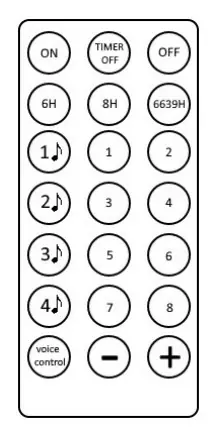
- ON/OFF: Turn the lights on or off.
- TIMER OFF: Disables the timer.
- 6H: 6 hours on, 18 hours off.
- 8H: 8 hours on, 16 hours off.
- 6639H: 6 hours on, 6 hours off, then 3 hours on, 9 hours off.
- 1-8: Selects between 8 different light modes.
- 1♪ - 4♪: Music blinking modes.
- VOICE CONTROL: Activates reaction to loud music.
- +/-: Adjusts brightness.
Maintenance
To clean the lights, use a damp cloth. Always disconnect from the electricity mains first and allow the lights to dry completely before using them again.
Practical help
Common problems
Lights not reacting to voice control
Ensure the music is loud enough or the source is close to the microphone on the power adapter.
Timer not working
Hold the button on the power adapter for approx. 5 seconds until it lights up to activate the timer.
Before use
- Unpack the lights completely before plugging in.
- Ensure the cable is not damaged.
- Use only the supplied power adapter.
- Check that the environment is within -20°C to +50°C.
Images and diagrams
- The remote control allows switching between 8 light modes, adjusting brightness, and activating voice control.
- The button on the power adapter can be used to switch modes and toggle the timer.
Model compatibility
- Suitable for outdoor use (IP44).
- Requires 1x CR2025 3V battery for the remote control.

Manual page author
Emily Carter
User documentation editor
Prepares concise manual descriptions and highlights the most useful setup, operation, and maintenance information for readers.