SonicWall SonicWave 224w Quick Start Guide
Quick start guide for the SonicWall SonicWave 224w wireless access point. Includes deployment steps, package contents, and management requirements.
PDF source: ZH · summary: English
Quick answers from the manual
Quick answer
- The SonicWave 224w is deployed in three steps: register using the SonicWiFi app, power the device using a PoE injector (not included), and manage it via Capture Security Center or a SonicWall Firewall (requires SonicOS 6.5.4+). p. 1
Key actions
- Register the device using the SonicWall SonicWiFi app. p. 1
- Power the device using a PoE injector (not included). p. 1, 2
First start
- Register via app, connect to internet via PoE, and configure management via cloud or firewall. p. 1
Show 2 more answers Show less
Technical specifications
| Parameter | Value | Meaning | Pages |
|---|---|---|---|
| Power | PoE | Requires external PoE injector or power adapter (not included). | p. 1, 2 |
| Firewall Firmware | SonicOS 6.5.4+ | Minimum firmware version required for firewall management. | p. 1 |
Where to find it in the PDF
- Deployment Steps p. 1
- Package Contents p. 2
Table of contents
Manual images
Click an image to enlargeQuick guide from the manual
The SonicWave 224w deployment process consists of three main steps: registration, power connection, and management configuration. Please note that a PoE injector or power adapter is required for operation but is not included in the package.
Package contents
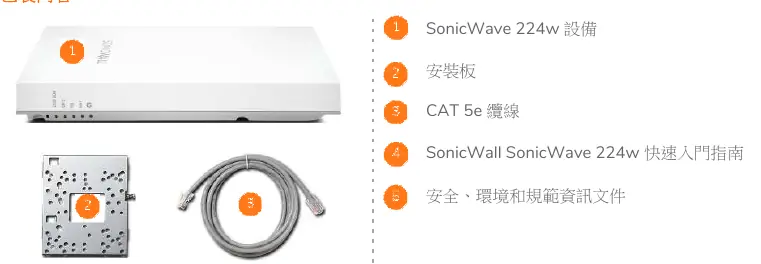
- SonicWave 224w device
- Mounting plate
- CAT 5e cable
- Quick Start Guide
- Safety, Environmental, and Regulatory Information document
Deployment steps
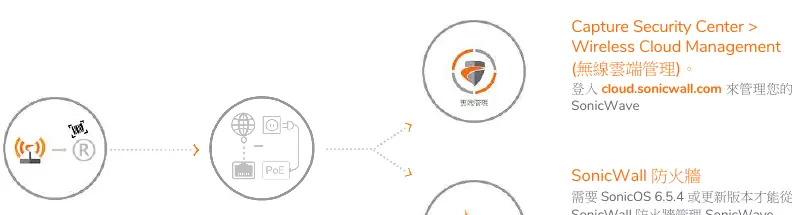
- Register: Download the SonicWall SonicWiFi app to register your SonicWave device.
- Connect and Power: Use a PoE injector (not included) to power the SonicWave and connect it to the internet.
- Manage: Configure and manage your device via the Capture Security Center or a SonicWall Firewall.
Management options
You can manage the SonicWave 224w using two primary methods:
- Capture Security Center: Log in to cloud.sonicwall.com and navigate to Wireless Cloud Management.
- SonicWall Firewall: Connect the SonicWave to the WLAN zone of your firewall. Note that the firewall must be running SonicOS 6.5.4 or newer to manage the SonicWave.
Support
If any items are missing from the package, please contact SonicWall technical support at https://www.sonicwall.com/support/contact-support.
Official resources from the manual
Practical help
Common problems
Ensure you are using a PoE injector or power adapter, as these are not included in the package.
Ensure your SonicWall Firewall is running SonicOS 6.5.4 or newer.
Before use
- Verify all package contents are present
- Obtain a compatible PoE injector or power adapter
- Ensure your SonicWall Firewall firmware is updated to at least version 6.5.4
- Download the SonicWall SonicWiFi app for registration

Manual page author
Emily Carter
User documentation editor