SONOFF iFan04 Wi-Fi Smart Ceiling Fan with Light Controller User Manual
Comprehensive user guide for the SONOFF iFan04 Wi-Fi Smart Ceiling Fan with Light Controller, covering installation, app setup, and safety instructions.
Table of contents
Product Overview
The SONOFF iFan04 is a sophisticated Wi-Fi smart controller designed to upgrade your existing ceiling fan with light into a smart device. By replacing the traditional wall switch or remote control, this device allows you to manage your fan speed and light brightness remotely via the eWeLink app. It is an ideal solution for modernizing home comfort, providing convenience through smartphone control, voice commands, and automated scheduling.
Safety Precautions
Installation must be performed by a qualified electrician to ensure safety and compliance with local electrical codes. Before starting, always turn off the power supply at the main circuit breaker to prevent electric shock. Ensure that the device is installed in a dry, indoor environment and is not exposed to moisture or extreme temperatures. Do not attempt to modify the internal circuitry, as this may void the warranty and create fire hazards.
Installation and Wiring
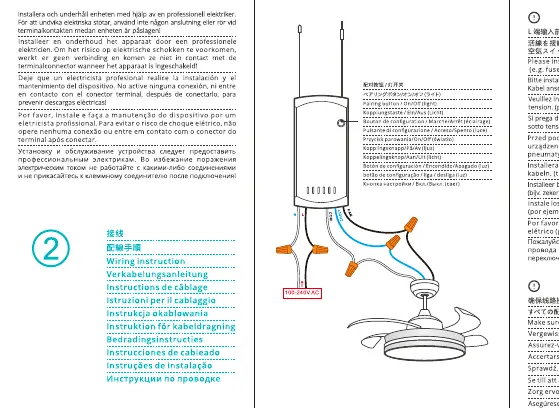
The installation process involves connecting the iFan04 controller between your power source and the ceiling fan unit. Carefully follow the wiring diagram provided in the manual to ensure the live, neutral, and ground wires are correctly matched. The controller is designed to fit within the canopy of most standard ceiling fans. Ensure all connections are secure and insulated with electrical tape or wire nuts before restoring power.
App Setup and Configuration
To enable smart features, download the eWeLink app from the App Store or Google Play. Once installed, power on the device and ensure it is in pairing mode. Follow the in-app instructions to add the iFan04 to your Wi-Fi network. Once connected, you can rename your device, share control with family members, and set up smart scenes or timers. The device supports voice control integration with popular smart home platforms, allowing you to adjust fan speeds or toggle lights using simple voice commands.
Maintenance and Troubleshooting
Regular maintenance involves checking the wiring connections periodically to ensure they remain tight. If the device becomes unresponsive, verify your Wi-Fi connection and ensure the power supply is active. If the device fails to pair, perform a factory reset by holding the pairing button for several seconds until the LED indicator flashes. For persistent issues, consult the troubleshooting section or contact professional support. Always dispose of electronic waste according to local environmental regulations to minimize ecological impact.
Practical help
Common problems
Ensure the Wi-Fi signal is strong, the password is correct, and the device is in pairing mode.
Check all wiring connections and ensure the circuit breaker is turned on.
Before use
- Turn off power at the circuit breaker
- Verify compatibility with your fan motor
- Ensure you have a neutral wire available
- Download the eWeLink app
- Check Wi-Fi signal strength at installation site
Images and diagrams
- Wiring diagram shows connection between power source, controller, and fan/light unit
- Indicates proper placement of the controller inside the fan canopy
Model compatibility
- Designed for ceiling fans with lights
- Requires 2.4GHz Wi-Fi network

Manual page author
Michael Turner
Technical manual editor
Reviews PDF manuals for structure, safety notes, and practical product details so readers can find the right information quickly.