Lighting / Fixtures
Spectrum ONU (SONU) 10G EPON DPoE Advanced Fiber Voice Modem User Guide
Comprehensive user guide for the Spectrum SONU 10G EPON DPoE Advanced Fiber Voice Modem, covering installation, LED status indicators, port connections, and troubleshooting.
Table of contents
Manual images
Jump to the sectionProduct Overview
The Spectrum ONU (SONU) is a 10G EPON DPoE Advanced Fiber Voice Modem designed to provide high-speed internet and voice services. This device is engineered for reliable performance and requires specific power and environmental conditions to operate correctly. It features multiple ports on the rear panel for internet connectivity, voice services, and battery backup integration.
Safety and Installation
Proper installation is critical for the longevity and performance of your modem. The device requires an input of 100-127Vac, 50-60Hz and uses a 12Vdc 1.5A power adapter. Ensure the power adapter is fully inserted into the power port to maintain a secure connection. The modem should be installed in a location with an ambient temperature between 32°F (0°C) and 104°F (40°C) and at an altitude not exceeding 13,000 feet (3,962 meters). If the device shows signs of damage or abnormal behavior, disconnect it from the power source immediately.
Device Connections
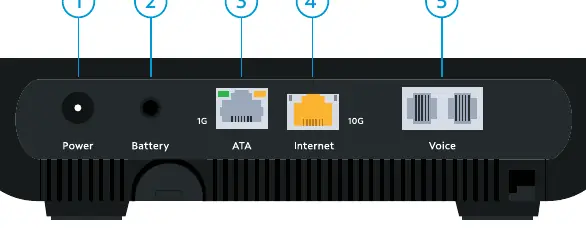
The rear panel of the SONU modem includes several ports for various functions. The 10G Ethernet port is intended for high-speed internet connectivity to routers or switches. The 1G Ethernet (ATA) port is designed for external ATA devices or IP phones. Voice ports 1 and 2 allow for the connection of analog telephones or DECT base stations, provided that telephone service is enabled on your account. A dedicated battery port is available for connecting an external backup battery (eBBU) to ensure service continuity during power outages.
LED Status Indicators
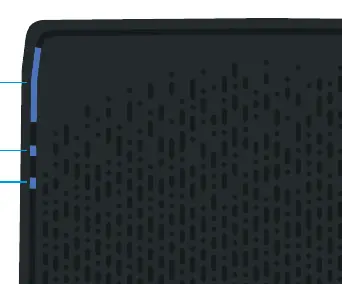
The top of the device features LED indicators that provide real-time status updates. The Status LED uses blue, red, and white colors to indicate power-up sequences, connection status, and potential signal issues. The Voice LED indicates whether voice services are provisioned and active. During firmware updates, the Status, Voice, and Battery LEDs will cycle in a specific pattern to indicate that the download is in progress. Additionally, the Ethernet ports feature their own LED indicators to show connection speed and data activity, helping users quickly diagnose network connectivity issues.
Device Reset and Maintenance
If you encounter connectivity issues, you may need to restart or reset the device. A power cycle can be initiated by holding the reset button for 4 seconds while the lights are illuminated. A factory reset, which restores the device to its original default settings and deletes all custom configurations, can be performed by holding the reset button for 10 seconds. If problems persist after a reset, please contact Spectrum customer support for further assistance.
Practical help
Common problems
Connectivity issues
Perform a power cycle by holding the reset button for 4 seconds or contact customer support.
PON signal not operational
Check the Status LED; if pulsing red, the device is unable to establish a connection.
Voice service not working
Ensure voice service is enabled via your account and check that the Voice LED is on.
Before use
- Ensure the power adapter is 12Vdc 1.5A.
- Verify the power plug is fully inserted.
- Check that the operating temperature is between 0°C and 40°C.
- Confirm the device is not at an altitude above 13,000 ft.
- Ensure all Ethernet cables are securely connected to the correct ports.
- Verify telephone service is enabled on your account for voice ports.
Specs in practice
- 10G Ethernet
- High-speed port for connecting to a router or network switch.
- 1G Ethernet (ATA)
- Port for external voice expansion or IP phones.
- Battery Port
- Dedicated port for eBBU communication and alarms.
Images and diagrams
- The rear panel contains ports for Power, Battery, ATA, Internet, and Voice.
- The top panel houses the Status, Voice, and Battery LED indicators.
- Ethernet ports have integrated LEDs to indicate speed (100MB, 1G, 10G) and activity.
Model compatibility
- Voice service must be enabled via spectrum.net/support.
- Battery port is only for use with provided eBBU USC link cables.
- 1G ATA port is for external voice expansion only.

Manual page author
David Miller
Documentation analyst
Organizes user manual content into clear summaries, with attention to model details, product context, and everyday usability.