User Manual for Spigen PowerArc ArcField 2-in-1 Wireless Charger
Get started with your Spigen PowerArc ArcField 2-in-1 Wireless Charger. This guide covers setup, LED indicator meanings, safety precautions, and technical specifications.
Quick answers from the manual
Quick answer
- The Spigen PowerArc ArcField 2-in-1 Wireless Charger requires a 20W USB-C PD adapter. Place your device on the pad; a green light indicates charging. p. 1
Key actions
- Connect the charger to a 20W USB-C PD adapter. p. 1
Problems and fixes
LED blinks orange. Check power adapter.
p. 1Technical specifications
| Parameter | Value | Meaning | Pages |
|---|---|---|---|
| Input | 5V/2A, 9V/2A, 12V/2A | Power input requirements | p. 1 |
| Output | 5W/7.5W/10W/15W | Charging power output | p. 1 |
Where to find it in the PDF
- English Instructions p. 1
Table of contents
Manual images
Click an image to enlargeQuick guide from the manual
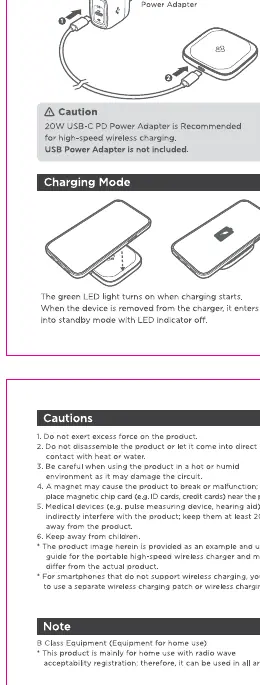
The Spigen PowerArc ArcField 2-in-1 Wireless Charger is designed for efficient wireless charging. Please note that a 20W USB-C PD adapter is required for operation but is not included in the package.
Setup and Operation
To begin using the charger, connect it to a 20W USB-C PD power adapter. Once connected, place your wireless charging-compatible device onto the center of the charging pad. The LED indicator will turn green when charging begins.
LED Indicator Display
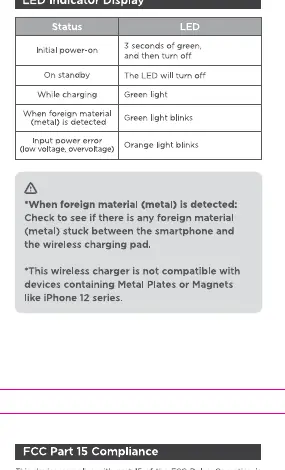
- Initial power: 3 seconds of green, then turns off.
- Standby: LED off.
- Charging: Green light.
- Input power error: Orange light blinks.
Safety and Cautions
- Do not place foreign materials, such as metal objects, between the smartphone and the charging pad.
- This product is not compatible with metal plates or magnets, including MagSafe plates used on the iPhone 12 series.
- Keep the device away from water, extreme heat, and moisture to prevent damage.
Technical Specifications
- Input: 5V/2A, 9V/2A, 12V/2A
- Output: 5W/7.5W/10W/15W
- Dimensions: 72.0 x 72.0 x 10.55mm
- Weight: 58g
Practical help
Common problems
This indicates an input power error. Ensure you are using a 20W USB-C PD adapter.
Check for foreign metal objects between the phone and the charger. Ensure the phone is properly aligned on the pad.
Before use
- Ensure you have a 20W USB-C PD adapter (not included).
- Check that the charging surface is free of metal objects.
- Verify the device is compatible with wireless charging.

Manual page author
David Miller
Documentation analyst
Organizes user manual content into clear summaries, with attention to model details, product context, and everyday usability.