Internet Connection and Software Update Guide for Spirit 1000ENT Elliptical Cross Trainer
Quick guide for connecting your Spirit 1000ENT Elliptical Cross Trainer to WiFi and performing software updates. Includes instructions for accessing maintenance mode, network requirements, and screen mirroring setup.
Table of contents
Quick Guide: Connecting to the Internet
To utilize the internet features on your Spirit 1000ENT, you must first establish a WiFi connection.
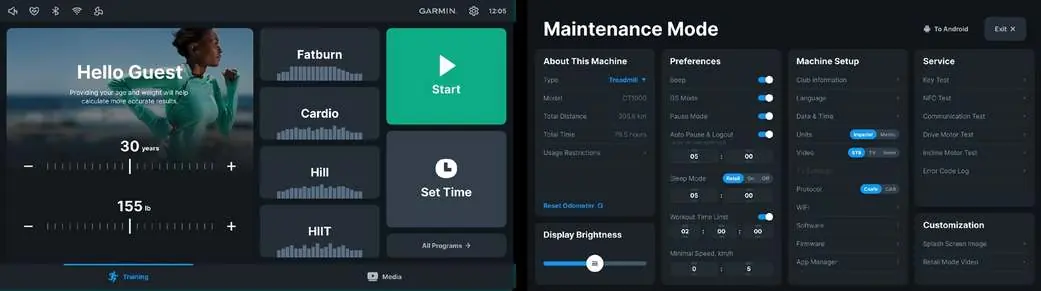
- Tap the WiFi icon located at the top of the screen.
- Select your network from the list.
- Enter the WiFi password if required.
Updating the Software
Keep your equipment software up to date to ensure optimal performance.
- Access Maintenance Mode by tapping the 'Hello Guest' button 10 times.
- Select 'Machine Setup'.
- Select 'Software'.
- Follow the prompts to complete any available updates.
Maintenance Mode
Maintenance Mode provides access to advanced settings, including machine setup, service tests, and software updates. To enter this mode, tap the 'Hello Guest' button 10 times on the main screen.
Network Requirements and Screen Mirroring
- Bandwidth: A minimum bandwidth of 1.5Mbps for every 4 units is recommended to support streaming applications.
- Screen Mirroring: For this feature to function, both the machine and the user's mobile device must be connected to the same WiFi network.
- Accessibility: Ensure the WiFi signal is accessible to users, either via an open network or by providing the necessary password.
Contact Information
For further assistance, contact Spirit Fitness:
Phone: 800-258-4555Email: [email protected]: WWW.SPIRITFITNESS.COM
Official resources from the manual
Practical help
Common problems
Ensure both the machine and the user's phone are connected to the exact same WiFi signal.
Verify that the WiFi bandwidth is at least 1.5Mbps for every 4 units connected.
Before use
- Check WiFi signal strength in the gym area
- Have the WiFi password ready
- Ensure the machine is powered on and the main screen is active

Manual page author
David Miller
Documentation analyst
Organizes user manual content into clear summaries, with attention to model details, product context, and everyday usability.