STAR WARS 15W Wireless Charging Pad
Official Star Wars 15W wireless charging pad with USB-C connectivity. Learn how to set up, safely operate, and maintain your device for optimal performance.
Table of contents
Product Overview
The Star Wars 15W Wireless Charging Pad is a high-performance charging solution designed for compatible mobile devices. It features a sleek design with a dedicated wireless charging surface and an integrated LED indicator light to monitor charging status.
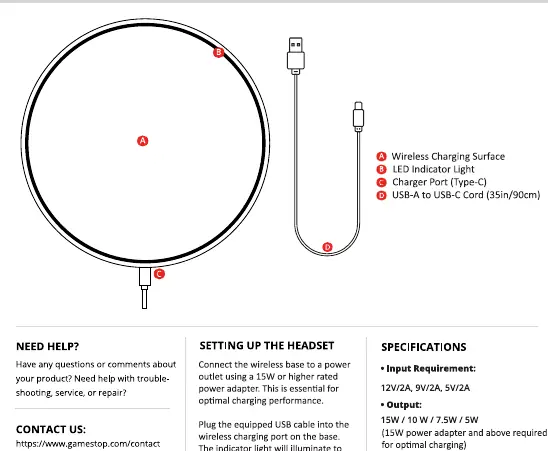
Technical Specifications
- Input Requirement: 12V/2A, 9V/2A, 5V/2A
- Output: 15W / 10W / 7.5W / 5W
- Connectivity: USB-C
For optimal charging performance, it is essential to use a 15W or higher rated power adapter. Using a lower wattage adapter may result in slower or inefficient charging.
Setting Up and Operation
To begin using your charging pad, connect the provided USB-C cable to the charging port on the base and plug the other end into a wall power adapter. Place your mobile device centrally on the wireless charging surface. Charging will begin automatically upon proper alignment.
Charging Indicator Status
- Flashing Red: Charging mobile device
- Solid Yellow: Charge complete or idle
Important Safety Instructions
To ensure safe operation and prevent damage to your device or the charger, please adhere to the following guidelines:
- Use only certified 15W or higher power adapters.
- Do not use the charger if the cable or adapter is damaged.
- Keep the charging base away from water and other liquids; do not use in humid environments like bathrooms.
- Do not place metal objects, such as coins, keys, or magnetic stripe cards, on the charging surface during use, as this may cause overheating or damage.
- Keep out of reach of children and pets.
- Avoid placing the device near heat sources or in direct sunlight.
- If the device becomes excessively hot, disconnect it immediately and allow it to cool down before resuming use.
- Do not attempt to disassemble or repair the unit yourself.

Manual page author
Michael Turner
Technical manual editor
Reviews PDF manuals for structure, safety notes, and practical product details so readers can find the right information quickly.