StarTech.com USB-C Multiport Adapter - HDMI & VGA - 3x USB - SD/uSD - GbE - 100W
A comprehensive guide for the StarTech.com USB-C Multiport Adapter, covering installation, power delivery, port functionality, and troubleshooting for optimal connectivity.
Table of contents
Product Overview
The StarTech.com USB-C Multiport Adapter is a versatile connectivity solution designed to expand the capabilities of your USB-C enabled laptop. It features a wide array of ports including HDMI and VGA for video output, three USB-A ports for peripherals, SD and Micro SD card slots, and a Gigabit Ethernet port for reliable wired networking. The device supports USB Power Delivery 3.0, allowing for efficient charging of your host laptop while connected to peripherals.
Connectivity and Ports
The adapter provides multiple high-speed interfaces. The USB-A ports and the USB-C data port support SuperSpeed USB 5Gbps (USB 3.2 Gen 1) data transfer rates. The integrated card reader supports SD v3.0 UHS-I cards, allowing for simultaneous data transfer from both SD and Micro SD slots. For networking, the RJ45 port supports 10/100/1000 Mbps speeds, indicated by LED lights that show connection status and network activity.
Power Delivery and Operation
The adapter can operate in two power modes. In USB-Bus-Powered mode, it draws power directly from the host laptop, which is sufficient for most peripheral connections. For high-power requirements or to charge your laptop, the Power Delivery Pass-Through mode is used. By connecting your laptop's USB-C power adapter to the dedicated Power Delivery port on the adapter, you can pass up to 100W of power to the host device. This setup also utilizes the Fast Role Swap feature, which prevents data interruption when switching between bus power and external power sources.
Display and Setup
The adapter supports a single external display via either the HDMI or VGA port. Please note that if both ports are connected simultaneously, the device will prioritize the HDMI output. To ensure proper functionality, the host computer must support DP Alt Mode and USB Power Delivery. Always ensure your host device meets these requirements for full compatibility. The adapter is designed for plug-and-play convenience, requiring no complex driver installations for basic functionality.
Maintenance and Disposal
Keep the adapter in a dry environment and avoid exposing the ports to dust or moisture. When the device reaches the end of its lifecycle, please dispose of it according to local electronic waste regulations. The product is recyclable; check local collection points for proper disposal methods to minimize environmental impact.
Official resources from the manual
Practical help
Common problems
The adapter supports only one display at a time. If both HDMI and VGA are connected, the HDMI port takes priority.
Ensure the power adapter is connected to the USB-C Power Delivery Passthrough port and that the host laptop supports USB Power Delivery 3.0.
Before use
- Verify host computer has a USB-C port
- Confirm host supports DP Alt Mode
- Ensure host supports USB Power Delivery
- Check that the HDMI or VGA cable is securely connected
- Ensure the host laptop is powered on
Specs in practice
- USB 3.2 Gen 1
- Supports data transfer speeds up to 5Gbps.
- USB Power Delivery 3.0
- Allows for pass-through charging up to 100W to the host laptop.
- DP 1.2 Alt-Modus
- Required for video output over the USB-C connection.
Images and diagrams
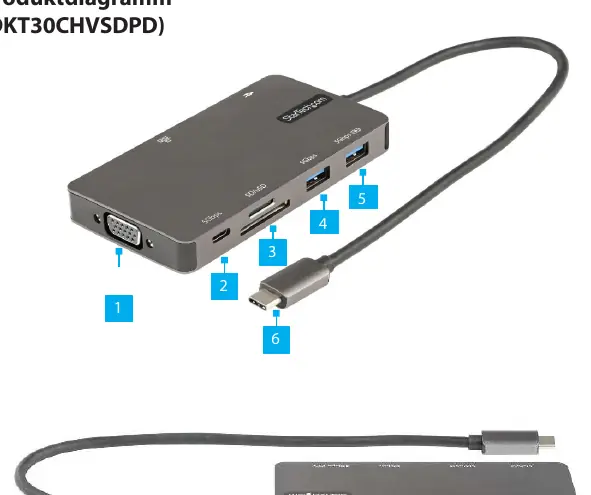
- Port 1: VGA output for displays up to 1920x1080 60Hz.
- Port 6: USB-C Host connection to the laptop.
- Port 7: USB-C Power Delivery input for charging the host.
- Port 8: RJ45 Ethernet port.
- Port 9: HDMI output for displays up to 4K 30Hz.
Model compatibility
- Requires a host computer with a USB-C port.
- Host must be compatible with DP Alt Mode for video output.
- Fast Role Swap requires the host laptop to support Power Delivery 3.0.

Manual page author
Emily Carter
User documentation editor
Prepares concise manual descriptions and highlights the most useful setup, operation, and maintenance information for readers.