StarTech.com VSEDIDHD HDMI EDID Emulator - 1080p
Solve video communication issues between HDMI sources and displays with the StarTech.com VSEDIDHD EDID Emulator. Supports EDID copying and ghosting for seamless 1080p connectivity.
Table of contents
Product Overview
The StarTech.com VSEDIDHD is a high-performance EDID emulator designed to resolve common video communication problems that occur between HDMI video sources and displays. Many video extenders, switches, or KVM devices can block the EDID (Extended Display Identification Data) communication, which often leads to the video source failing to output the display's native resolution. This emulator ensures that your HDMI source and display are perfectly synchronized, providing crystal-clear image quality.
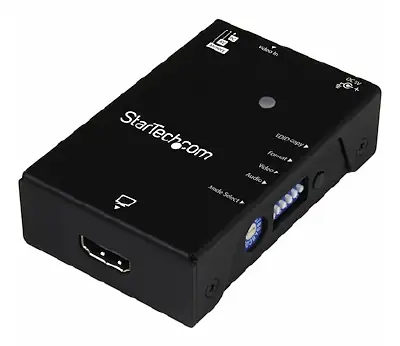
Key Features and Functionality
The device supports two primary methods to solve EDID-related issues: EDID Copy and EDID Ghosting. EDID Copy allows the emulator to store the specific settings from your display and transmit them directly to the source, which is ideal for bypassing interference caused by third-party hardware. EDID Ghosting enables the emulation of generic EDID settings, providing a reliable solution for older equipment or analog-to-digital adapters that may not output EDID data correctly.
The emulator simplifies the management of complex display data, such as maximum image size, color properties, and frequency range limits. Users can configure all these settings in one simple step using the integrated rotary switch. The device is housed in a durable steel casing and is powered via USB, making it a robust and portable solution for professional AV setups.
Technical Specifications and Compatibility
The VSEDIDHD supports high-definition resolutions up to 1920x1080 (1080p) at 60Hz. It is compatible with a wide range of resolutions, including 1680x1050, 1600x1200, 1600x900, 1440x900, 1366x768, 1280x1024, 1280x720, and 1024x768. The unit features a single status LED for easy monitoring. It operates efficiently in temperatures ranging from 0°C to 40°C and can be stored in environments between -20°C and 60°C.
Setup and Maintenance
The package includes the EDID emulator, a USB power cable, a screwdriver for adjustments, and four adhesive feet for stable placement. The device is designed for effortless setup; simply connect the HDMI cables and use the rotary switch to select the desired EDID configuration. The emulator retains settings even when disconnected from power, ensuring a plug-and-play experience for future use. It is a maintenance-free solution that provides long-term reliability for complex video configurations.
Official resources from the manual
Practical help
Common problems
Use the EDID emulator to copy the display's EDID data to the source.
Connect the emulator to store and provide the necessary EDID information to the source.
Use the EDID Ghosting feature to emulate generic EDID settings.
Before use
- Ensure HDMI cables are available for connection.
- Verify the display supports the desired resolution.
- Check that a USB port is available for power.
- Identify if EDID Copy or Ghosting is required for your setup.
- Use the included screwdriver if adjustments are needed.
Specs in practice
- Max Resolution
- Supports up to 1920x1080 (1080p) at 60Hz.
- EDID Ghosting
- Emulates generic display data for compatibility.
Model compatibility
- Compatible with HDMI-based video sources and displays.
- Supports widescreen formats.
- Works with KVMs, video switches, and extenders.

Manual page author
David Miller
Documentation analyst
Organizes user manual content into clear summaries, with attention to model details, product context, and everyday usability.