StarTech 164B-USBC-MULTIPORT USB-C 5-in-1 Multiport Adapter
Quick-start guide for the StarTech 164B-USBC-MULTIPORT adapter. Learn how to connect your HDMI display, USB peripherals, and power delivery charger to your USB-C host computer.
Table of contents
Quick guide from the manual
This guide covers the setup and operation of the StarTech 164B-USBC-MULTIPORT adapter. To use this device, your host computer must have a USB-C port that supports both Power Delivery (for charging) and DP Alt Mode (for video output). The host computer will automatically detect and install the adapter upon connection.
Device overview
The adapter features the following ports and connections:
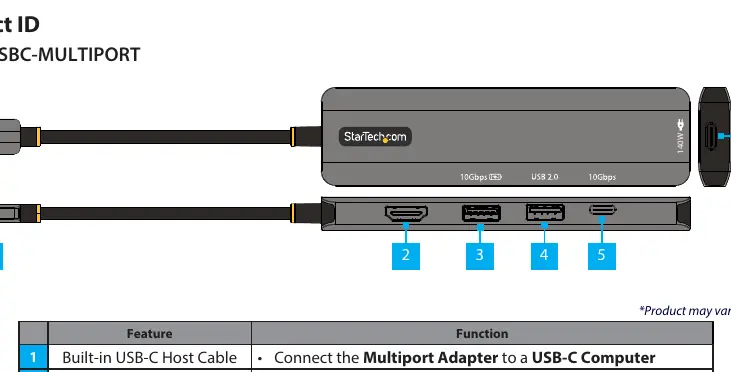
- Built-in USB-C Host Cable: Connects the adapter to your computer.
- HDMI Output: Connects to an HDMI display.
- USB-A 10Gbps Port: Supports high-speed data transfer and Battery Charge 1.2.
- USB-A 2.0 Port: Supports standard USB-A peripherals.
- USB-C Data Port: Supports data transfer up to 10Gbps.
- USB-C Power Delivery Passthrough Port: Supports up to 140W power delivery to charge the host computer.
Installation
- Connect the built-in USB-C host cable to a DP Alt Mode-enabled USB-C port on your computer.
- Connect an HDMI cable from the adapter's HDMI output to your display.
- Connect your USB peripherals to the available USB-A and USB-C data ports.
- Connect a USB-C power adapter to the USB-C Power Delivery port to charge your host computer.
Practical help
Common problems
Ensure the USB-C port on the computer supports Power Delivery.
Ensure the USB-C port on the computer supports DP Alt Mode.
Before use
- Verify the host computer has an available USB-C port.
- Ensure the host USB-C port supports DP Alt Mode for video output.
- Ensure the host USB-C port supports Power Delivery for charging.
- Have an HDMI cable ready for display connection.
- Have a USB-C power adapter ready for pass-through charging.

Manual page author
Emily Carter
User documentation editor
Prepares concise manual descriptions and highlights the most useful setup, operation, and maintenance information for readers.