Installation Guide for Strong KIT CPL 2000 Powerline Adapter
Quick installation guide for the Strong KIT CPL 2000 Powerline adapter kit. Learn how to connect your router and devices to extend your internet connection via electrical outlets, including pairing and reset procedures.
Quick answers from the manual
Quick answer
- To install the Strong KIT CPL 2000, connect the first adapter to your router and a wall outlet, then connect the second adapter to your device and a wall outlet. If pairing is needed, hold the reset button on each adapter for 2 seconds. p. 2
Key actions
- Connect router to adapter 1 and plug into wall. p. 2
- Connect device to adapter 2 and plug into wall. p. 2
- Pairing/Reset: Press button for 2 seconds. p. 2
First start
- Plug adapters directly into wall outlets, connect Ethernet cables to router and device. p. 2
Problems and fixes
Perform manual pairing by holding the reset button for 2 seconds on both adapters.
p. 2Maintenance and reset
- Press and hold the reset button for 2 seconds. p. 2
Technical specifications
| Parameter | Value | Meaning | Pages |
|---|---|---|---|
| Speed | 2000 Mbit/s | Maximum data transfer rate | p. 1 |
Where to find it in the PDF
- Installation and Pairing p. 2
Table of contents
Manual images
Click an image to enlargeQuick installation guide
The Strong KIT CPL 2000 allows you to extend your internet connection through your home's electrical wiring. Follow these steps to set up your powerline adapters.
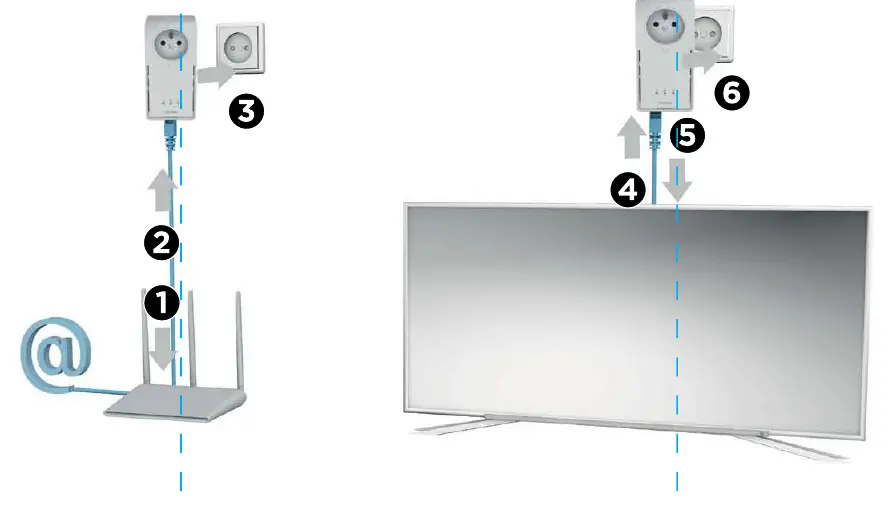
Connecting the adapters
- Connect an Ethernet cable from your router to the first powerline adapter.
- Plug the first powerline adapter directly into a wall electrical outlet.
- Ensure the adapter is securely connected.
- Connect an Ethernet cable from your device (e.g., TV, PC) to the second powerline adapter.
- Plug the second powerline adapter directly into a wall electrical outlet near your device.
- Ensure the connection is secure.
Pairing and Reset
If the adapters do not connect automatically or if you need to reset the pairing:
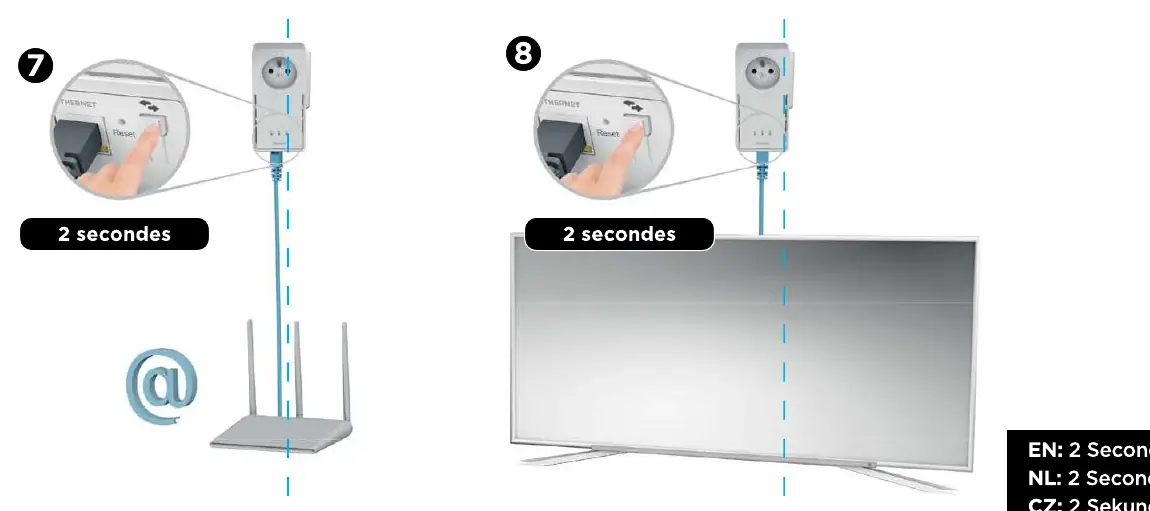
- Locate the Reset/Pairing button on the side of the adapter.
- Press and hold the button for 2 seconds on the first adapter.
- Press and hold the button for 2 seconds on the second adapter to complete the pairing process.
Practical help
Common problems
Ensure both adapters are plugged directly into wall outlets and not power strips. Perform the pairing process again by holding the reset button for 2 seconds.
Before use
- Two Ethernet cables
- Two wall electrical outlets
- Router with available LAN port

Manual page author
David Miller
Documentation analyst
Organizes user manual content into clear summaries, with attention to model details, product context, and everyday usability.