Sungrow 3-Phase String Inverter Feed-in Settings Guide
Quick guide for configuring feed-in limitation settings on Sungrow 3-phase string inverters. Learn how to set zero feed-in, adjust limitation values, and understand technician requirements.
Table of contents
Quick Guide to Feed-in Settings
This document provides instructions for configuring feed-in limitation parameters on Sungrow 3-phase string inverters. These settings are accessed via the advanced setting interface.
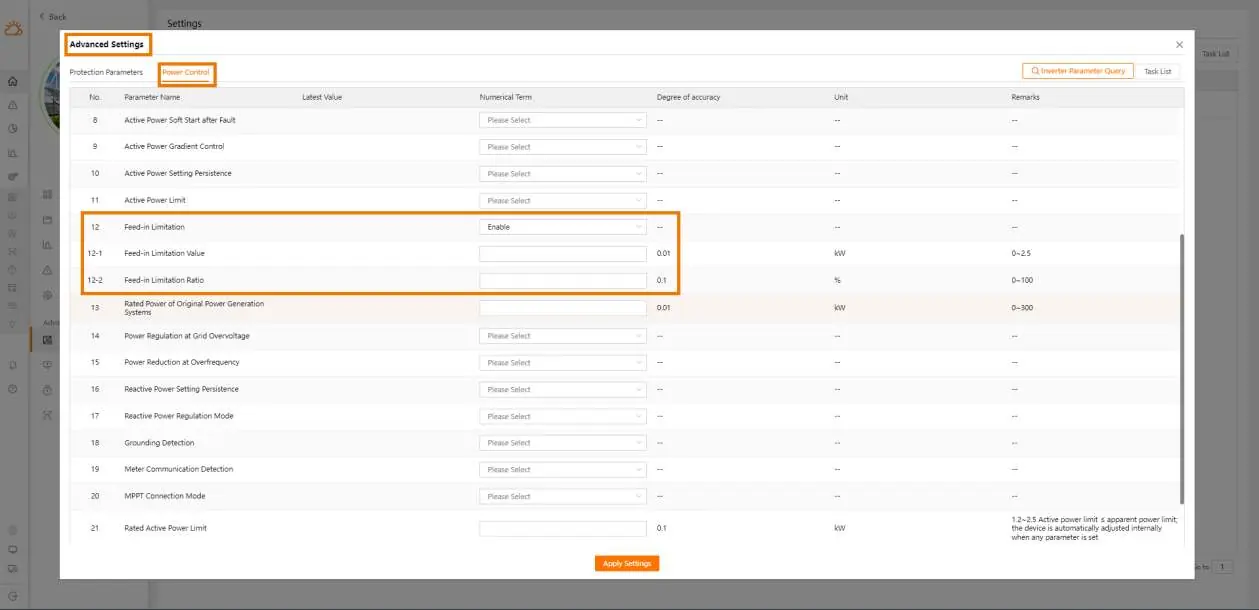
Zero Feed-in Configuration
- Access the advanced setting interface.
- Enable the Feed-in Limitation function.
- Set the Feed-in Limitation Value to 0 (0 kW feed-in).
Feed-in Limitation Configuration
- Access the advanced setting interface.
- Enable the Feed-in Limitation function.
- Set the Feed-in Limitation Value according to your specific site requirements.
No Network Feedback
If there is no feedback from the network, the Feed-in Limitation function must be turned off.
Technician Requirements
Installation, operation, maintenance, and troubleshooting must be performed by professional technicians who meet the following criteria:
- Possess electronic, electrical wiring, and mechanical expertise.
- Are familiar with electrical and mechanical schematics.
- Have received professional training related to the installation, commissioning, and troubleshooting of electrical equipment.
- Are capable of responding quickly to hazards or emergencies.
- Are familiar with local standards and safety regulations.
Practical help
Common problems
Enable 'Feed-in Limitation' and set 'Feed-in Limitation Value' to 0.
Enable 'Feed-in Limitation' and set 'Feed-in Limitation Value' to the required kW.
Turn off the 'Feed-in Limitation' function.
Before use
- Ensure you are a professional technician with electrical expertise.
- Verify you have access to the advanced setting interface.
- Ensure you understand local safety regulations.

Manual page author
Emily Carter
User documentation editor
Prepares concise manual descriptions and highlights the most useful setup, operation, and maintenance information for readers.