Takstar DT-2 Dante Connect Box User Manual
Quick guide for the Takstar DT-2 Dante Connect Box, covering front and rear panel controls, technical specifications, and safety instructions for audio networking.
Table of contents
Manual images
Jump to the sectionQuick guide from the manual
The Takstar DT-2 is a Dante-enabled audio interface designed for professional audio networking. It supports 2-in/2-out digital audio channels with 24-bit precision and low latency. This device is compatible with standard network switches and supports hot backup functionality. Ensure all connected equipment matches the power requirements of the DT-2 before operation.
Front Panel Controls
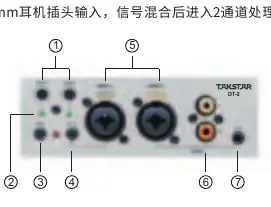
- Gain Potentiometer: Adjusts input gain for channels 1-2 (max 50dB).
- Signal Indicators: Displays signal levels for input channels 1-2.
- Phantom Power Switch: Activates +48V power for channels 1-2.
- High Resistance Switch: Matches impedance when connecting instruments via 6.3mm jack.
- Combo Input Socket: XLR for microphones or 6.3mm jack for instruments.
- RCA Input: Stereo input for media players or computers.
- Headset Input: 3.5mm socket for headset audio input.
Rear Panel Connections
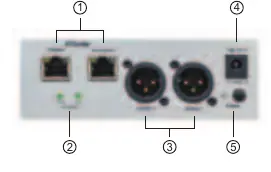
- Dante Network Interface: Dual network ports for direct connection or switch-based audio transmission.
- Signal Indicators: Displays output levels for channels 1-2.
- XLR Output: Balanced signal output for channels 1-2.
- Power Input: DC 12V power supply socket.
- Power Switch: Main power toggle with indicator light.
Technical Parameters
- Input Impedance: Balanced 10kΩ, Unbalanced 5kΩ
- MIC Input Gain: 50dBu
- Max Input/Output Level: +15dBu
- Dynamic Range: >105dB
- THD+N:<0.01%
- Frequency Response: 20Hz-20kHz (-0.5dB)
- Power Requirement: DC 12V 2A
Safety Instructions
To prevent damage or injury, observe the following:
- Do not operate at excessive volumes for long periods to avoid hearing damage.
- If smoke, odor, or other abnormalities occur, immediately disconnect power and contact a dealer.
- Keep the device in a dry, ventilated indoor environment away from fire, rain, or excessive dust.
- Do not disassemble or modify the unit; all repairs must be handled by authorized service personnel.
Practical help
Common problems
Immediately turn off the power switch, unplug the device, and contact your local dealer for maintenance.
Ensure the High Resistance switch is engaged when using the 6.3mm jack for instruments to properly match impedance.
Before use
- Verify that the power supply matches the DC 12V 2A requirement.
- Ensure all connected equipment power ratings are compatible with the DT-2.
- Check that the environment is dry and well-ventilated.
- Confirm network cables are connected to the Dante ports if using network audio.
Specs in practice
- 48V Phantom Power
- Provides power to condenser microphones; enable only when using compatible microphones.
- High Resistance Switch
- Adjusts input impedance for high-impedance sources like guitars or bass guitars.
- Dante 2IN/2OUT
- Allows the device to send and receive two channels of digital audio over a standard Ethernet network.
Images and diagrams
- Front panel features combo XLR/Jack inputs, gain controls, and phantom power switches.
- Rear panel features dual Dante network ports, XLR outputs, and the DC power input.
Model compatibility
- Compatible with standard network switches for Dante audio distribution.
- Supports hot backup and cascading network configurations.

Manual page author
David Miller
Documentation analyst
Organizes user manual content into clear summaries, with attention to model details, product context, and everyday usability.