User Manual for TC Electronic TUBE PILOT OVERDRIVE
Quick start guide and technical specifications for the TC Electronic TUBE PILOT OVERDRIVE guitar pedal. Learn how to connect your instrument, adjust overdrive settings, and understand power requirements.
Table of contents
Quick guide from the manual
The TC Electronic TUBE PILOT OVERDRIVE is a guitar effects pedal featuring a 12AX7 tube. This guide provides essential information for setting up and operating the device.
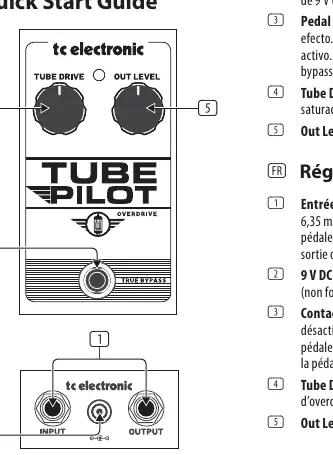
Controls
- Input/Output jacks: Connect a 1/4" cable from your guitar to the INPUT jack, and connect a cable from the OUTPUT jack to your amplifier.
- 9 V DC: Connect a 9 V power supply (not included).
- Footswitch: Turns the effect on and off. The LED lights up when the pedal is engaged. The pedal operates in true bypass when disengaged.
- Tube Drive: Adjusts the amount of overdrive and saturation.
- Out Level: Adjusts the output volume.
Specifications
- Input: 1/4" TS, unbalanced, 1 MΩ impedance.
- Output: 1/4" TS, unbalanced, 1 kΩ impedance.
- Power input: Standard 9 V DC, center negative, >400 mA (not included).
- Current consumption: 400 mA.
- Dimensions (H x W x D): 58 x 74 x 132 mm.
- Weight: 0.5 kg.
Manufacturer information
TC Electronic
Practical help
Common problems
Check that the 9V power supply is connected and active. Ensure 1/4" cables are securely connected to both the guitar/pedal and pedal/amplifier.
Verify that the 9V DC power supply is properly connected and providing power.
Before use
- Ensure you have a 9V DC power supply (not included).
- Use 1/4 inch TS unbalanced cables for all audio connections.
- Verify the pedal is in bypass mode if no sound is desired.

Manual page author
David Miller
Documentation analyst
Organizes user manual content into clear summaries, with attention to model details, product context, and everyday usability.