TCL TAB 10V Quick Start Guide
Quick start guide for the TCL TAB 10V tablet. Learn how to use the power button, navigation keys, insert a microSD card, and charge your device.
Table of contents
Manual images
Click an image to enlargeQuick guide from the manual
This document provides the essential setup and navigation instructions for the TCL TAB 10V tablet. It covers the physical button layout, basic navigation gestures, and how to insert a microSD card and charge the device.
Device Overview
The tablet features several physical controls:
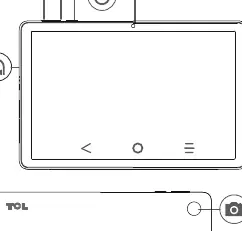
- Power key: Located on the top edge, used to turn the device on or off.
- Volume keys: Located near the power key, used to adjust audio levels.
- Camera: Front-facing camera located at the top center.
- Headphone jack: Located on the side of the device.
Navigation
The tablet uses standard on-screen navigation buttons:

- Back: Returns to the previous screen.
- Home: Returns to the main home screen.
- Recent apps: Displays a list of recently used applications.
Setup and Charging
To prepare your device for use:
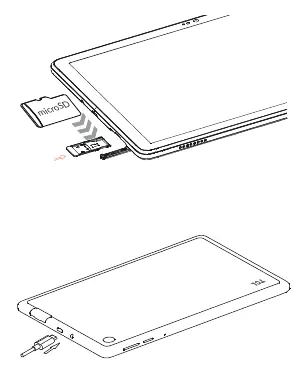
- microSD Card: Insert the card into the designated slot on the side of the device.
- Charging: Connect the charging cable to the port located on the bottom edge of the tablet.
Manufacturer information
TCL
Practical help
Before use
- Charge the tablet fully before first use.
- Insert a microSD card if additional storage is needed.
- Identify the power and volume keys on the top edge of the device.
Images and diagrams
- The front view diagram identifies the power key, volume keys, camera, and headphone jack.
- The navigation diagram explains the function of the Back, Home, and Recent apps icons.
- The setup diagram illustrates the correct orientation for inserting a microSD card and connecting the charging cable.

Manual page author
Michael Turner
Technical manual editor
Reviews PDF manuals for structure, safety notes, and practical product details so readers can find the right information quickly.