Outdoor Light Tecnolite 10HLED124MV30N User Manual
Quick guide for the Tecnolite 10HLED124MV30N outdoor light. Includes installation steps, wiring diagrams, safety warnings, and technical specifications.
Table of contents
Quick guide from the manual
This document provides installation and maintenance instructions for the Tecnolite 10HLED124MV30N outdoor light. Always disconnect the power source before performing any installation or maintenance work.
Safety Precautions
- The luminaire must be installed at least 0.50 m away from any combustible material to avoid fire hazards.
- The lamp and parts may become hot; use gloves or a clean rag when handling.
- Ensure the ground connection is physical.
Installation
Follow these steps to install the luminaire:
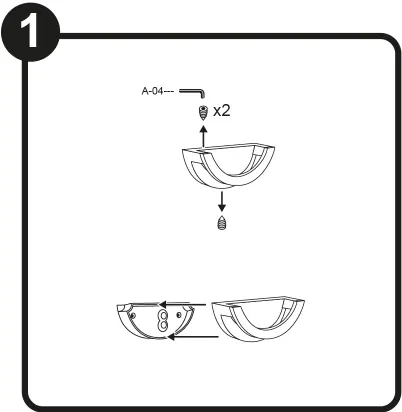
- Prepare the mounting surface and drill holes as required.
- Insert anchors (A-02) into the holes.
- Secure the base to the wall using washers (A-03) and lag screws (A-01).
- Connect the electrical wires (Line, Ground, Neutral) according to the wiring diagram.
- Attach the luminaire cover to the base and secure it using the Allen wrench (A-04).
Maintenance
To maintain the luminaire:
- Disconnect the power source before cleaning.
- Clean the luminaire and internal parts with a dry rag.
- Periodically check all electrical connections.
Technical Specifications
- Power Supply: 100 V - 240 V, 50 Hz/60 Hz
- Power: 10 W
- Lamp Type: LED
- Protection Rating: IP65, IK08
Manufacturer information
Tecnolite
Practical help
Common problems
Light not turning on
Check electrical connections and ensure the power source is active.
Overheating
Ensure the luminaire is not covered and is installed in a well-ventilated area.
Before use
- Disconnect power source before installation.
- Ensure mounting surface is at least 0.5m away from combustible materials.
- Verify voltage matches 100-240V range.
- Check that all parts (A-01 to A-04) are present.

Manual page author
Emily Carter
User documentation editor
Prepares concise manual descriptions and highlights the most useful setup, operation, and maintenance information for readers.