Owner's Manual for Tesla Powerwall 2 AC
Quick guide for the Tesla Powerwall 2 AC, covering safety instructions, system operation, troubleshooting, emergency procedures, and maintenance.
Table of contents
Manual images
Jump to the sectionQuick guide from the manual
This document provides essential safety, operation, and maintenance information for the Tesla Powerwall 2 AC. It is intended for use by owners and must be read in its entirety before operating the system. Installation and repairs must only be performed by Tesla Certified Installers.
Safety Instructions
- High Voltage: Installation and service require knowledge of high voltage electricity.
- Heavy Equipment: Powerwall is heavy; use lift equipment.
- Chemical Exposure: Contains lithium and cobalt compounds. Do not open the external casing.
- Environmental Limits: Do not install near heating equipment, in direct flame, or where flooding is possible. Ensure no water sources are above or near the unit.
- Prohibitions: Do not immerse in water, insert foreign objects, paint the unit, or connect directly to PV solar wiring.
Operation
The Powerwall is controlled by the Gateway via the Tesla app. The Powerwall On/Off switch should remain in the ON position during normal operation. Do not operate the unit unless all covers are in place.
Troubleshooting
If the system is unresponsive, check the LED status on the right side of the Powerwall:
- Solid: Enabled/Communication with Gateway.
- Flashing: Enabled/No communication with Gateway.
- Pulsing: Enabled and charging/discharging.
- Off: Not enabled or switched off.
If the system is unresponsive, perform a power cycle: turn off the Powerwall, turn off the AC breakers for the system, wait one minute, turn the breakers back on, and turn on the Powerwall.
Emergency Procedures
In case of emergency, contact the fire department or emergency services first. If safe to do so:
- Fire: Turn off Powerwall and AC breakers. Use water, CO2, or ABC extinguishers. Avoid type D extinguishers.
- Flooding: Stay out of water if the unit is submerged. Turn off Powerwall and AC breakers.
- Coolant Leak: Avoid skin contact. Ventilate the area. Use absorbent material like cat litter to clean spills.
Maintenance
The system requires no pre-scheduled preventative maintenance. Keep the unit free of debris, especially around air intake and exhaust vents.
Practical help
Common problems
Check home internet connection. If still unresponsive, perform a power cycle: turn off Powerwall, turn off AC breakers, wait 1 minute, turn breakers on, then turn on Powerwall.
Avoid skin contact. Turn off Powerwall and AC breakers. Ventilate the area. Use absorbent material (cat litter/sawdust) to clean up, then contact a Tesla Certified Installer.
Before use
- Ensure the Powerwall is installed by a Tesla Certified Installer.
- Verify the Powerwall On/Off switch is in the ON position.
- Download the latest version of the Tesla app for monitoring.
- Ensure the system is connected to the internet for firmware updates.
- Keep the area around air intake and exhaust clear of debris.
Specs in practice
- Operating Temperature
- -20°C to 50°C (-4°F to 122°F). Performance may be limited at extremes.
- Optimum Temperature
- 0°C to 30°C (32°F to 86°F) for best performance.
- Coolant Capacity
- Up to 2.3 L (2.4 qt) of coolant.
Images and diagrams
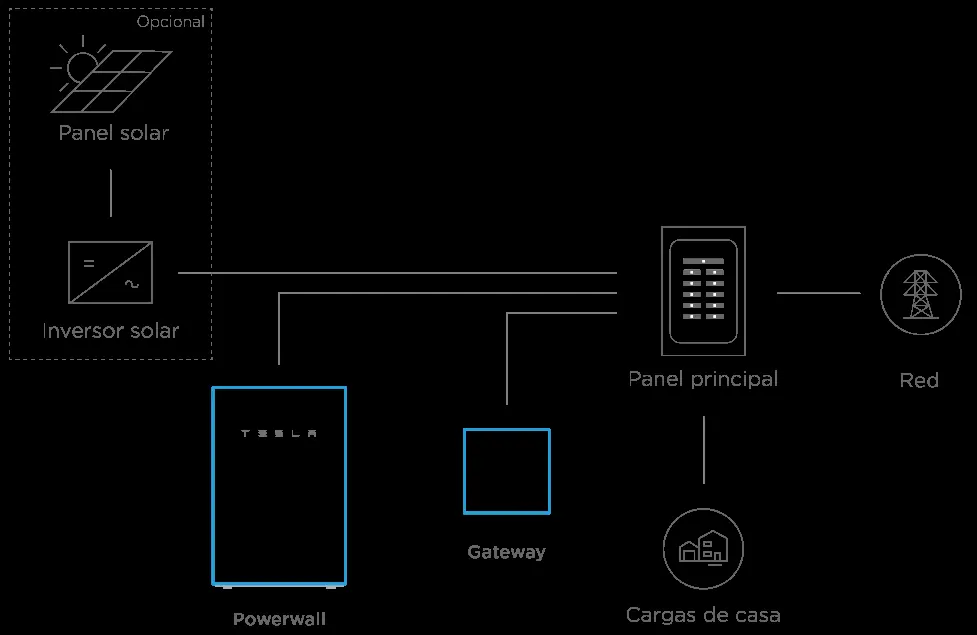
- System diagrams show the integration of the Powerwall with the Gateway, solar inverter, main panel, and utility meter.
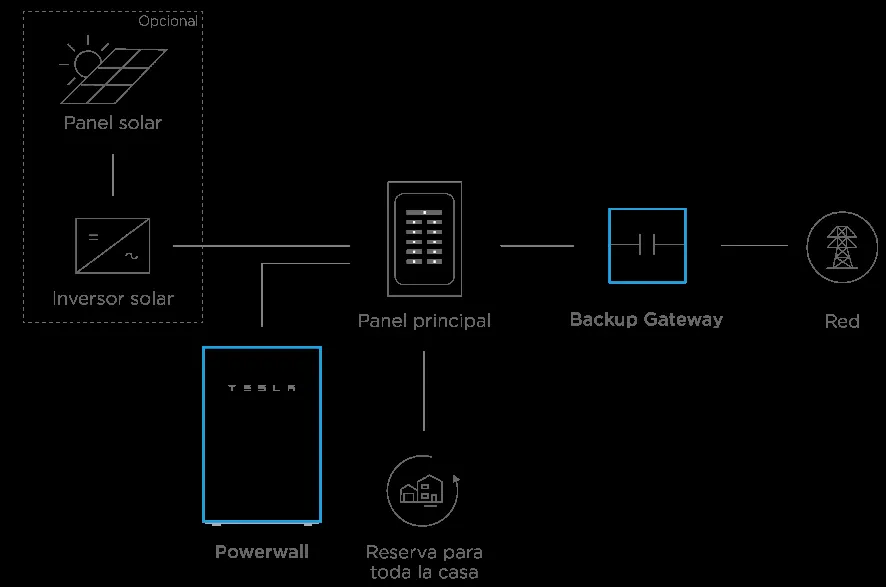
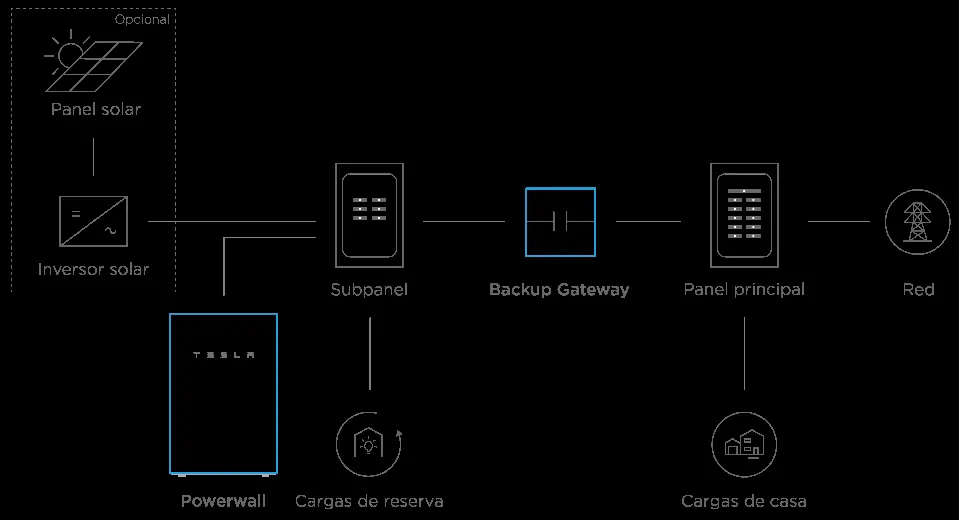
- Backup system diagrams illustrate the placement of the Backup Gateway between the service entry and the main panel (whole-home) or between the main panel and a subpanel (partial-home).
Model compatibility
- Manual applies to Powerwall 2 AC (1092170-xx-x), Gateway (1099752-xx-x), Backup Gateway (1118431-xx-x), and Gateway Meter (1112484-xx-x).
- Do not connect Powerwall directly to photovoltaic (PV) solar wiring.

Manual page author
David Miller
Documentation analyst
Organizes user manual content into clear summaries, with attention to model details, product context, and everyday usability.