Instruction Manual for The Home Depot 21E4R Metal Garden Trellis
Assembly guide for the The Home Depot 21E4R metal garden trellis. Includes parts list, step-by-step assembly instructions, and tips for using the binding wire.
Quick answers from the manual
Quick answer
- To assemble the trellis, connect the top and bottom sections using the provided screws and nuts. Use the binding wire to join multiple trellises or secure plant branches. p. 1
Key actions
- Connect top and bottom trellis sections using screws and nuts. p. 1
- Use binding wire to connect multiple trellises or secure branches. p. 1
Where to find it in the PDF
- Assembly Instructions p. 1
Table of contents
Assembly Instructions
The garden trellis consists of two main sections (top and bottom) that must be connected. Align the top and bottom trellis sections. Secure the connection using the provided screws and nuts at the designated connection points.
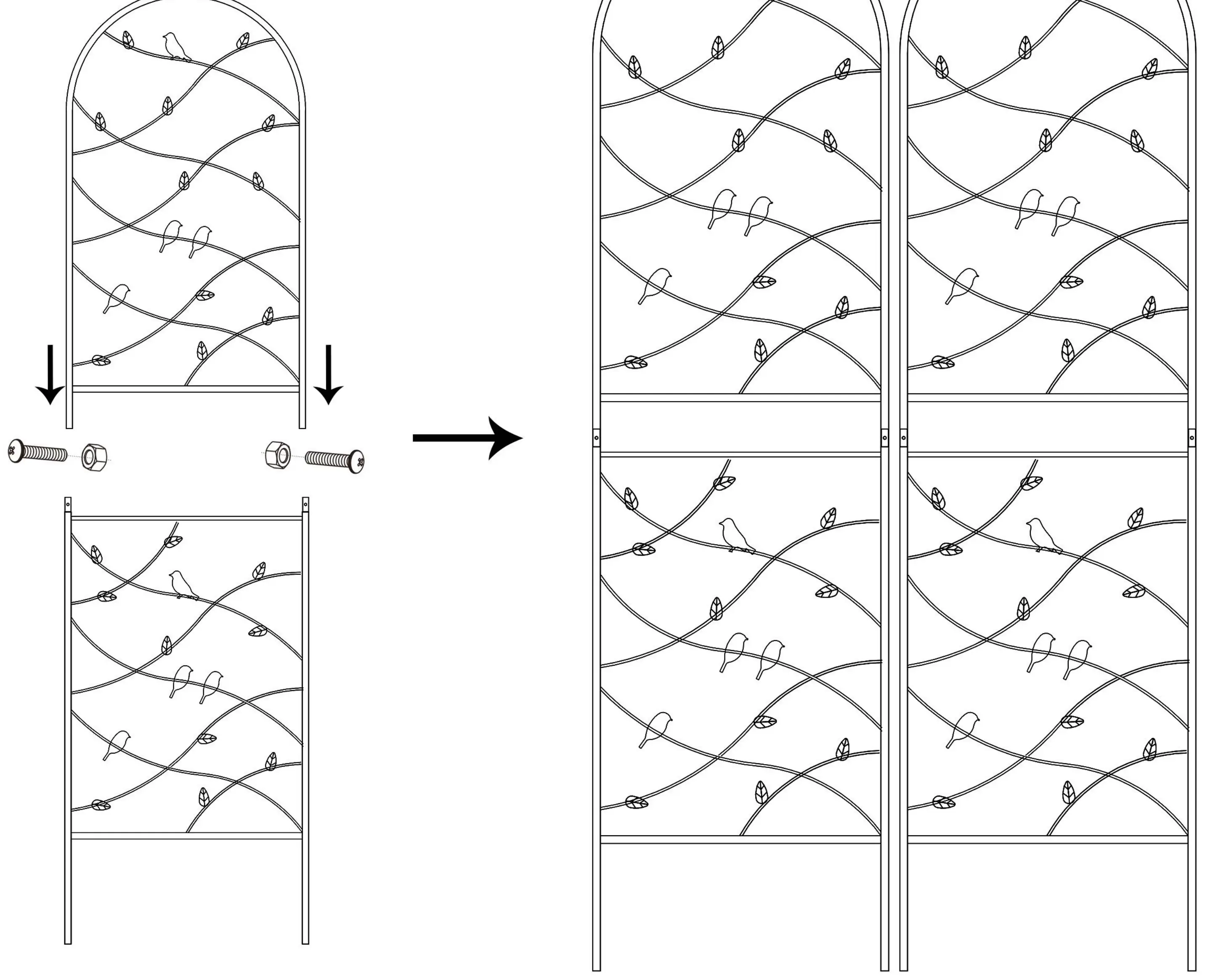
Parts List
- 2x Top Trellis sections
- 2x Bottom Trellis sections
- 4x Screw and Nut sets
- Binding Wire
Usage Tips
The included binding wire can be used to connect two trellis units together for a wider display or to secure plant branches to the trellis structure.
Manufacturer information
The Home Depot
Practical help
Common problems
Ensure all screws and nuts are tightened securely at the connection points between the top and bottom sections.
Verify that you are aligning the correct top and bottom sections and that the screw holes are properly aligned.
Before use
- Unpack all components and verify the parts list.
- Ensure you have 2 top trellis sections and 2 bottom trellis sections.
- Check for 4 sets of screws and nuts.
- Locate the binding wire for final installation.

Manual page author
Emily Carter
User documentation editor
Prepares concise manual descriptions and highlights the most useful setup, operation, and maintenance information for readers.