Operating Instructions for Topmaq 20L Electronic Safe
Quick guide for the Topmaq 20L electronic safe. Learn how to set your user code, open the safe with the emergency key, and install it securely.
Quick answers from the manual
Quick answer
- To open the safe for the first time or if you forget your code, use the emergency key. To set a user code, open the battery compartment, press the reset button, enter your 3-8 digit code, and confirm with 'A' or 'B'. p. 1
Key actions
- Setting user code p. 1
- Installing the safe p. 1
First start
- Install batteries and set user code p. 1
Show 3 more answers Show less
Problems and fixes
Emergency opening
Take off the cover, insert the emergency key, turn to the left, then turn the knob to the right.
p. 1Maintenance and reset
- Reset button is used to set new user codes. p. 1
Where to find it in the PDF
- Instruction sheet p. 1
Table of contents
Quick guide from the manual
This document provides essential instructions for operating and installing your Topmaq 20L electronic safe. Key procedures include setting your personal access code, emergency opening, and secure wall mounting.
Accessories
- 4x Bolts
- 4x Batteries
- 1x Carpet
- 2x Emergency keys
How to open the safe
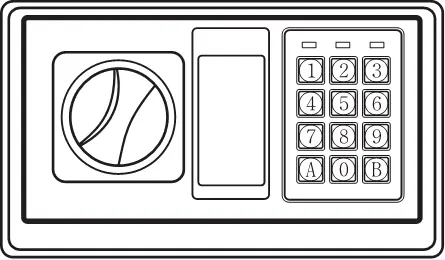
- Remove the cover to access the keyhole.
- Insert the emergency key and turn it to the left.
- Turn the knob to the right and open the door.
Setting the user code
- Open the battery compartment and insert the batteries.
- Press the reset button.
- Within 15 seconds, enter your new user code (3-8 digits).
- Press 'A' or 'B' to confirm.
- To set a master code: With the door open, press '0' twice, press the reset button, enter your master code (3-8 digits), and press 'A' or 'B' to confirm.
Installing the safe
- Place the safe against the wall.
- Mark the drilling locations.
- Drill the holes.
- Insert expansion bolts into the holes.
- Align the safe with the bolts, insert screws, and tighten.
Important safety note
Do not leave your emergency key inside the safe.
Practical help
Common problems
Locked out / Forgot code
Use the emergency key to open the safe manually.
Safe won't open
Check if batteries are installed correctly or replace them.
Before use
- Check accessories: 4 bolts, 4 batteries, 1 carpet, 2 emergency keys.
- Install batteries in the compartment.
- Set your personal user code.

Manual page author
Michael Turner
Technical manual editor