TOZO VIZO V1 AR Glasses User Guide
Comprehensive user guide for TOZO VIZO V1 AR glasses, covering setup, vision adjustment, controls, and maintenance instructions.
Table of contents
Product Overview
The TOZO VIZO V1 AR glasses are designed to provide an immersive visual experience by connecting to devices with DP-output capabilities via a Type-C cable. These glasses feature adjustable diopter settings to accommodate users with vision requirements between 0 and 500 degrees.
Connection and Wearing
To begin using the device, connect the glasses to a compatible DP-output device using the provided Type-C cable. When putting on the glasses, unfold the temples completely to avoid pinching the skin. Wear the glasses from the top down, ensuring the cable is positioned behind the ears. For optimal comfort and clarity, gently adjust the nose pads to align the display correctly.
Vision Adjustment and Controls
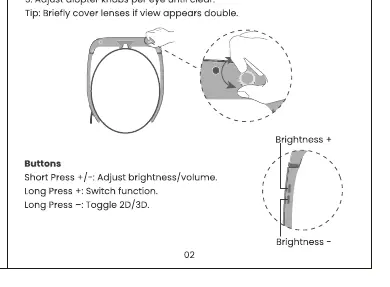
The VIZO V1 allows for personalized vision correction. Users can adjust the diopter knobs located on the device until the view becomes clear. If you are unsure about the focus, you can briefly cover one lens at a time to verify the clarity of the image for each eye individually.
Button Functions
The glasses are equipped with intuitive controls for managing your experience:
- Short Press (+/-): Adjusts the brightness or volume levels.
- Long Press (+): Switches between different functions.
- Long Press (-): Toggles between 2D and 3D viewing modes.
Maintenance and Safety
To ensure the longevity of your TOZO VIZO V1 glasses, handle them with care and keep the lenses clean. Always ensure the temples are fully unfolded before wearing to prevent mechanical stress or skin irritation. If you encounter issues with the display, verify the Type-C connection to your source device and ensure it supports DP-output. For further assistance or support, please contact the manufacturer directly.

Manual page author
David Miller
Documentation analyst
Organizes user manual content into clear summaries, with attention to model details, product context, and everyday usability.