Tracer Edgy 10L Shredder User Manual
Official user manual for the Tracer Edgy 10L document shredder, covering safety instructions, operation, maintenance, and troubleshooting.
Table of contents
Product Overview
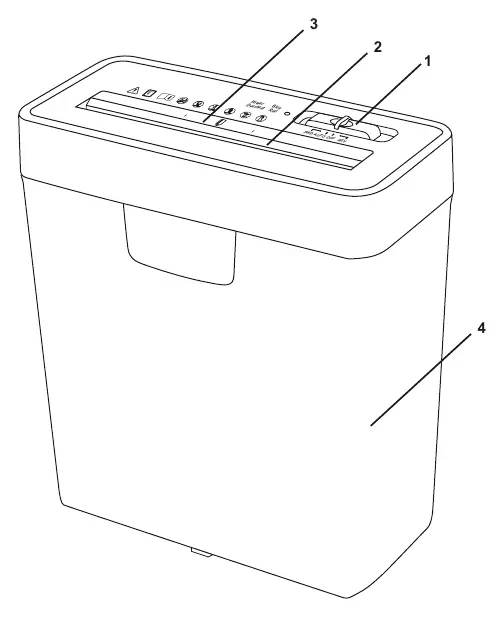
The Tracer Edgy 10L is a strip-cut document shredder designed for home and office use. It features a 3-position slide switch (AUTO, OFF, REV) and a dedicated entry slot for paper and credit cards. The device is equipped with a wastebasket for collecting shredded material.
Safety Instructions
Warning: The shredder contains sharp, moving parts. Always keep loose clothing, ties, jewelry, hair, and other small items away from the feed opening to prevent injury. Do not insert hands or fingers into the shredder throat. The device is not intended for use by children; keep it out of reach and do not leave it unattended when children or pets are nearby.
- Always turn off and unplug the device before moving, cleaning, or emptying the wastebasket.
- Do not use the device if the power cord is damaged.
- For indoor use only.
- Do not spray flammable gases or oils on the device, as this may cause a fire.
- Do not shred credit cards, CDs/DVDs, and paper simultaneously.
Operation
To operate the shredder, set the slide switch to the AUTO position. Insert paper vertically into the feed opening; the device will start automatically and return to standby mode once shredding is complete. If a jam occurs, set the switch to REV to reverse the rotation and clear the paper, then return the switch to OFF.
Maintenance and Performance
To ensure a long service life and optimal performance, do not exceed the maximum shredding capacity of 6 sheets of A4 paper. The recommended operating cycle is 2 minutes of work followed by 1 hour of rest to prevent the motor from overheating. Frequently empty the wastebasket to prevent paper buildup, which can interfere with the shredding mechanism.
Troubleshooting
If the shredder continues to run after finishing, the wastebasket may be too full; empty it and press down the shredded paper. If the device stops due to a jam or overheating, set the switch to REV to clear the paper, unplug the unit, and allow it to cool down for several minutes before resuming operation.
Practical help
Common problems
The wastebasket is too full. Turn off the device, empty the basket, and press down the shredded paper to clear the area below the cutting head.
Set the switch to 'REV' to reverse the paper. If the motor overheated, unplug the device and let it cool down for several minutes.
The paper may be too thin, soft, or wrinkled to trigger the sensor. Fold the paper and try again, or ensure the paper edge is touching the sensor.
Before use
- Place the shredder on a flat, stable surface.
- Ensure the power voltage matches the device specifications (AC 230V, 50Hz).
- Remove all paper clips and staples from documents before shredding.
- Check that the wastebasket is empty and properly positioned.
- Ensure the slide switch is in the 'OFF' position before plugging in.
Specs in practice
- Cutting Style
- Strip cut.
- Shred Capacity
- Maximum 6 sheets of A4 paper at once.
- Operating Cycle
- 2 minutes of continuous operation followed by 1 hour of rest to prevent overheating.
Images and diagrams
- 1: 3-position slide switch (AUTO, OFF, REV).
- 2: Paper entry slot.
- 3: Credit card entry slot.
- 4: Wastebasket for shredded material.
Model compatibility
- Do not shred credit cards, CDs/DVDs, and paper at the same time.
- Not intended for use by children.
- Avoid inserting adhesive paper, tapes, or fabrics to prevent blade damage.

Manual page author
Michael Turner
Technical manual editor
Reviews PDF manuals for structure, safety notes, and practical product details so readers can find the right information quickly.