Quick Installation Guide for Trendnet TEG-MGBRJ and TEG-10GBRJ SFP Modules
Quick installation guide for Trendnet TEG-MGBRJ 1000BASE-T and TEG-10GBRJ 10G RJ-45 Copper SFP modules. Includes installation steps and compatibility requirements.
Table of contents
Quick Installation Guide
This guide provides instructions for the installation of Trendnet TEG-MGBRJ and TEG-10GBRJ copper SFP modules. These modules allow for the expansion of network connectivity via SFP or SFP+ slots on compatible network switches.
Installation Steps
Follow these steps to install the module into your network switch:
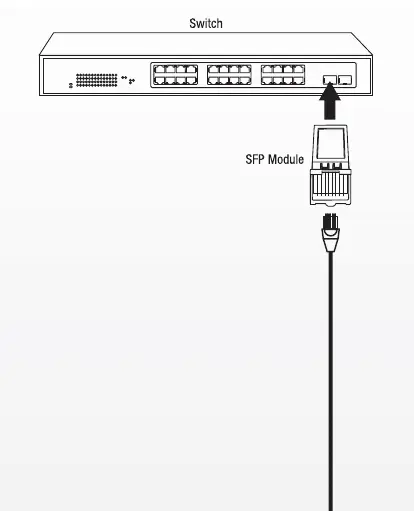
- Ensure your network switch is powered on or off according to your specific switch manufacturer's guidelines.
- Align the SFP module with the SFP or SFP+ slot on the switch.
- Insert the module firmly into the slot until it clicks into place.
- Connect your Ethernet cable to the RJ-45 port on the module.
Compatibility Notes
Please note the following requirement for the 10G module:
- The TEG-10GBRJ module requires a 10G SFP+ slot on your switch to function correctly.
Technical Support
For further assistance, contact Trendnet Technical Support.
Toll free US/Canada: 1-866-845-3673
Practical help
Common problems
Ensure the module is fully inserted into the slot. Verify that the switch port supports the specific module type (e.g., 10G SFP+ slot for TEG-10GBRJ).
Before use
- Verify the switch has an available SFP or SFP+ slot.
- Ensure the correct module is selected for the required speed (1000BASE-T vs 10G).
- Have a compatible RJ-45 Ethernet cable ready.

Manual page author
Emily Carter
User documentation editor
Prepares concise manual descriptions and highlights the most useful setup, operation, and maintenance information for readers.