TRIO 2209691XX Motion Sensor Installation Manual
Quick installation and setup guide for the TRIO 2209691XX motion sensor light. Includes step-by-step wiring instructions, mounting dimensions, and sensor adjustment settings.
Quick answers from the manual
Quick answer
- The TRIO 2209691XX is a motion-sensor light. Installation involves turning off the power, drilling holes according to the provided dimensions, connecting the wires (L, N, Earth), and adjusting the sensor settings. p. 2
Key actions
- Turn off power p. 2
- Connect wires p. 2
First start
- Adjust sensor settings p. 2
Show 3 more answers Show less
Problems and fixes
Check power supply and wiring
p. 2Technical specifications
| Parameter | Value | Meaning | Pages |
|---|---|---|---|
| Power | 6W | LED power consumption | p. 2 |
Where to find it in the PDF
- Safety Warnings p. 1
- Installation and Setup p. 2
- Energy Efficiency p. 3
Table of contents
Quick guide from the manual
This document provides essential installation and configuration instructions for the TRIO 2209691XX motion sensor light. Before beginning any installation work, ensure the main power supply is switched off at the circuit breaker to prevent electrical shock.
Installation
Follow these steps to mount and connect the device:
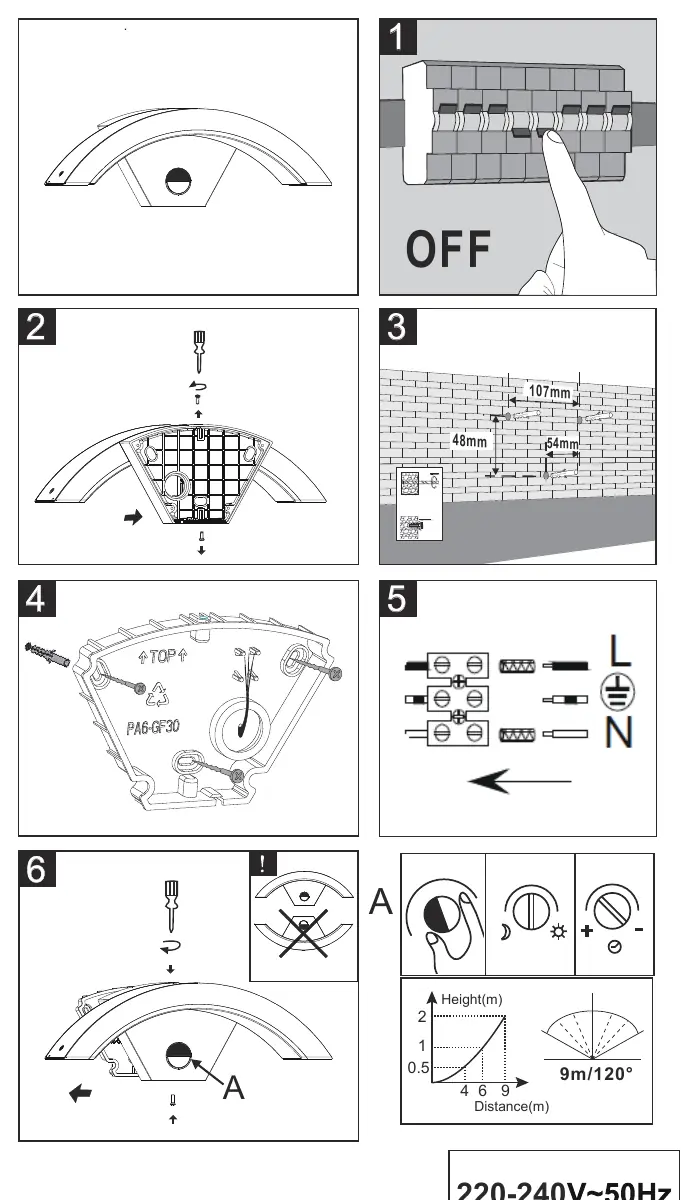
- Power Off: Ensure the power supply is disconnected.
- Preparation: Remove the cover to access the mounting holes.
- Drilling: Drill holes in the wall according to the specified dimensions (48mm, 54mm, and 107mm spacing).
- Mounting: Secure the base to the wall using appropriate fixings.
- Wiring: Connect the mains power cables to the terminal block, ensuring correct connection of Live (L), Earth, and Neutral (N) wires.
- Finalization: Reassemble the unit and adjust the sensor settings.
Sensor Settings
The sensor (labeled 'A' in the manual) features adjustable settings for sensitivity, time duration, and light threshold (day/night). Use the controls on the device to customize the detection range and operation according to your environment.
Technical Specifications
- Voltage: 220-240V~50Hz
- Power Consumption: 6W LED
- Energy Efficiency Class: F
Practical help
Common problems
Verify that the power supply is switched on at the circuit breaker and check all wiring connections.
Check the sensor settings (sensitivity and range) and ensure the installation height is appropriate.
Before use
- Ensure power is switched off at the circuit breaker
- Verify mounting surface is suitable for the device
- Check wiring diagram for correct L, N, and Earth connections
- Ensure all screws are tightened securely

Manual page author
David Miller
Documentation analyst