User Manual for Tronsmart Element Groove Wireless Speaker
Get the most out of your Tronsmart Element Groove Wireless Speaker with this quick guide. Learn how to pair via Bluetooth, use True Wireless Stereo mode, play music via AUX or Micro SD card, and troubleshoot common issues.
Table of contents
Quick guide from the manual
The Tronsmart Element Groove is a portable wireless speaker featuring Bluetooth 5.0, IPX7 water resistance, and True Wireless Stereo (TWS) capability. To get started, ensure the device is charged using the USB Type-C port. To pair with a device, turn on the speaker, wait for the blue LED to flash, and select 'Tronsmart Element Groove' in your device's Bluetooth settings.
True Wireless Stereo (TWS) Mode
You can pair two Groove speakers for surround sound:
- Turn on both speakers and ensure they are disconnected from any other Bluetooth device.
- Double-press the Power button on one speaker to enter TWS pairing mode (indicator flashes yellow).
- Once paired, the TWS indicators on both speakers will remain solid yellow.
- Connect your phone to the main speaker via Bluetooth.
- To disconnect TWS, double-press the Power button on one of the speakers.
Device Overview
The speaker features several physical controls and ports:
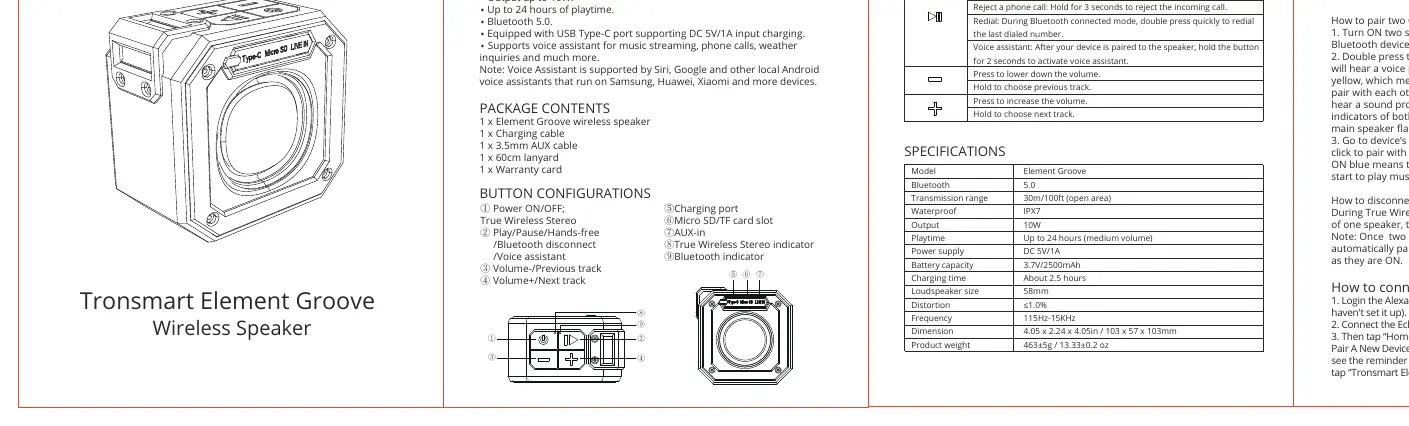
- Power ON/OFF: Hold to power on/off.
- Play/Pause/Hands-free/Voice Assistant: Single press to play/pause or answer/hang up calls. Hold for 3 seconds to reject a call. Hold for 2 seconds to activate voice assistant.
- Volume/Track Control: Press to adjust volume, hold to skip tracks.
- Ports: Includes a USB Type-C charging port, Micro SD/TF card slot, and 3.5mm AUX-in port.
Operation Modes
AUX-IN Mode
Connect the speaker to your audio source using the provided 3.5mm audio cable. The speaker will automatically switch to AUX mode once the cable is connected.
Micro SD/TF Card Mode
Press the Power button to switch from Bluetooth mode to Micro SD/TF card mode. The speaker supports cards up to 64GB.
Sleep Mode
The speaker enters Sleep Mode if it does not pair with any device via Bluetooth to conserve battery. Press the Power button to wake it up.
Maintenance and Safety
- Cleaning: Use a lightly dampened cloth to clean the exterior. Do not use detergents or chemicals.
- Handling: Do not disassemble the product. Avoid dropping or jumping on the device.
- Storage: Keep in a dry location to prevent dust and moisture accumulation.
- Forced Reset: If the speaker malfunctions, hold the Power button for 5-8 seconds to force it to turn off.
Specifications
- Bluetooth: 5.0
- Transmission Range: Up to 30m/100ft (open area)
- Waterproof Rating: IPX7
- Output: 10W
- Battery: 3.7V/2500mAh
- Charging Time: About 2.5 hours
- Frequency: 115Hz-15KHz
Practical help
Common problems
Hold the Power button for 5-8 seconds to force the speaker to turn off.
Ensure the speaker is turned on and the blue LED is flashing, indicating it is in pairing mode.
Ensure both speakers are disconnected from any other Bluetooth devices before attempting to pair them together.
Before use
- Charge the speaker fully using the provided USB Type-C cable.
- Ensure the speaker is within 30 meters of your Bluetooth source.
- If using a Micro SD card, ensure it is 64GB or smaller.
- Check that the speaker is not already connected to another device.
Images and diagrams
- Buttons 1-4 control power, playback, volume, and track selection.
- Ports 5-7 are for charging, Micro SD card insertion, and AUX audio input.
Model compatibility
- Voice Assistant is supported by Siri, Google, and other local Android voice assistants.
- Compatible with devices running Samsung, Huawei, Xiaomi, and other Android/iOS systems.

Manual page author
Emily Carter
User documentation editor
Prepares concise manual descriptions and highlights the most useful setup, operation, and maintenance information for readers.