User Guide for Trust Tanor Full HD Webcam
Quick setup guide for the Trust Tanor Full HD Webcam. Learn how to mount the camera, connect via USB-A, and use the privacy shutter.
Table of contents
Manual images
Click an image to enlargeQuick guide from the manual
This guide provides essential instructions for setting up and using your Trust Tanor Full HD Webcam. Follow the steps below to mount the device, connect it to your computer, and operate the privacy features.
Mounting the webcam
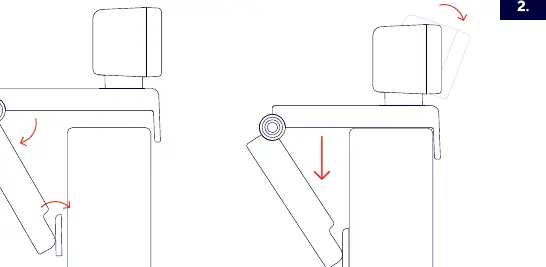
The webcam features an adjustable stand designed to sit securely on top of your monitor or laptop screen. Fold the stand as shown in the diagram to fit the thickness of your display, then place the camera on the top edge.
Connecting the webcam
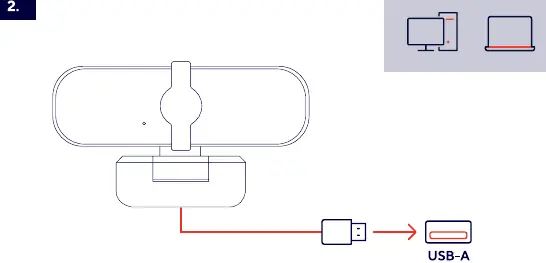
Connect the integrated USB-A cable directly to an available USB-A port on your computer or laptop. The device is plug-and-play and should be recognized automatically by your operating system.
Privacy shutter
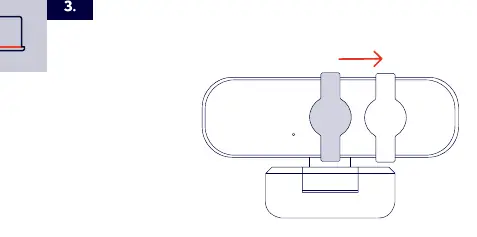
The webcam includes a built-in privacy shutter. Slide the shutter to the side to cover the lens when the camera is not in use, ensuring your privacy.
Status indicator
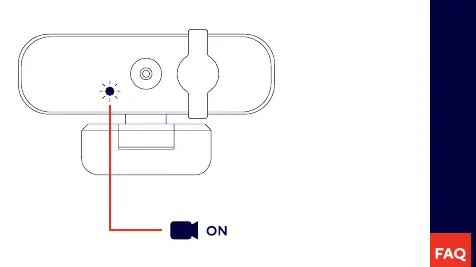
The webcam features a status light on the front. When the light is illuminated, the camera is active and in use.
Manufacturer information
Trust International B.V.
Practical help
Common problems
Ensure the USB-A cable is firmly connected to a working USB port on your computer or laptop.
Use the integrated privacy shutter to physically cover the lens when not in use.
Before use
- Ensure you have an available USB-A port.
- Position the webcam on top of your monitor or laptop screen.
- Adjust the stand to secure the camera.

Manual page author
Emily Carter
User documentation editor
Prepares concise manual descriptions and highlights the most useful setup, operation, and maintenance information for readers.