User Manual for Trust TM-101 Mouse
Quick guide for the Trust TM-101 wired mouse. Learn how to connect your device via USB-A and start using it immediately.
Table of contents
Quick Start Guide
The Trust TM-101 is a plug-and-play wired mouse designed for standard computer use. It does not require specific software installation to function on most operating systems.
Connection
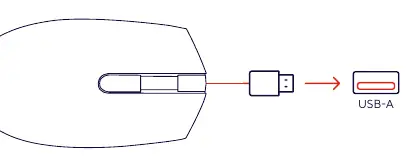
To use the mouse, simply insert the integrated USB-A cable into an available USB-A port on your computer or laptop. The device should be automatically recognized by your operating system immediately upon connection.
Troubleshooting
If the mouse is not responding or is not detected by your computer, please check the following:
- Ensure the USB-A connector is fully and securely inserted into the USB port.
- Try connecting the mouse to a different USB-A port on your computer to rule out a faulty port.
- Restart your computer if the device is still not detected after plugging it in.
Manufacturer information
Trust International B.V.
Practical help
Common problems
Ensure the USB-A plug is fully inserted. Try a different USB port on your computer or restart the system.
Before use
- Ensure your computer is powered on.
- Locate an available USB-A port on your device.
- Check the USB cable for any visible damage.

Manual page author
Emily Carter
User documentation editor
Prepares concise manual descriptions and highlights the most useful setup, operation, and maintenance information for readers.