Ubiquiti 10Gbps Ethernet to USB-C Adapter
Quick setup guide for the Ubiquiti 10Gbps Ethernet to USB-C Adapter. Learn how to connect your computer to a 10G network switch.
Table of contents
Quick guide from the manual
This document provides the basic setup instructions for the Ubiquiti 10Gbps Ethernet to USB-C Adapter. The device is designed to bridge a 10Gbps Ethernet network connection to a computer via a USB-C interface.
Package Contents
- 1x 10Gbps Ethernet to USB-C Adapter
- 1x USB-C cable
Installation
To set up the adapter, follow these steps:
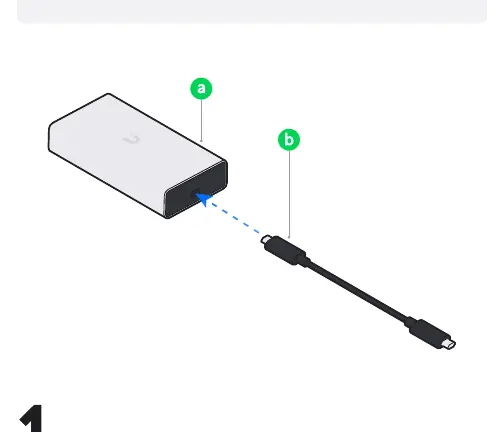
- Connect the Ethernet cable from your network switch to the Ethernet port on the adapter.
- Connect the provided USB-C cable to the adapter and your computer.
Support
If you need further assistance, visit the Ubiquiti Help Center or contact Ubiquiti Support.
Practical help
Common problems
Ensure the USB-C cable is securely connected to both the adapter and the computer. Verify that the Ethernet cable is properly seated in the switch port.
Before use
- Ensure you have a 10Gbps capable switch port available.
- Verify your computer has a USB-C port.
- Use the provided USB-C cable for optimal performance.

Manual page author
Michael Turner
Technical manual editor
Reviews PDF manuals for structure, safety notes, and practical product details so readers can find the right information quickly.