Ubiquiti Flex 2.5G 8 PoE Installation Guide
Quick installation guide for the Ubiquiti Flex 2.5G 8 PoE switch. Includes package contents and mounting instructions.
Table of contents
Manual images
Click an image to enlargeQuick guide from the manual
This document provides installation instructions for the Ubiquiti Flex 2.5G 8 PoE switch. It outlines the package contents and mounting options to ensure proper setup.
Package contents
Ensure your package contains the following items:
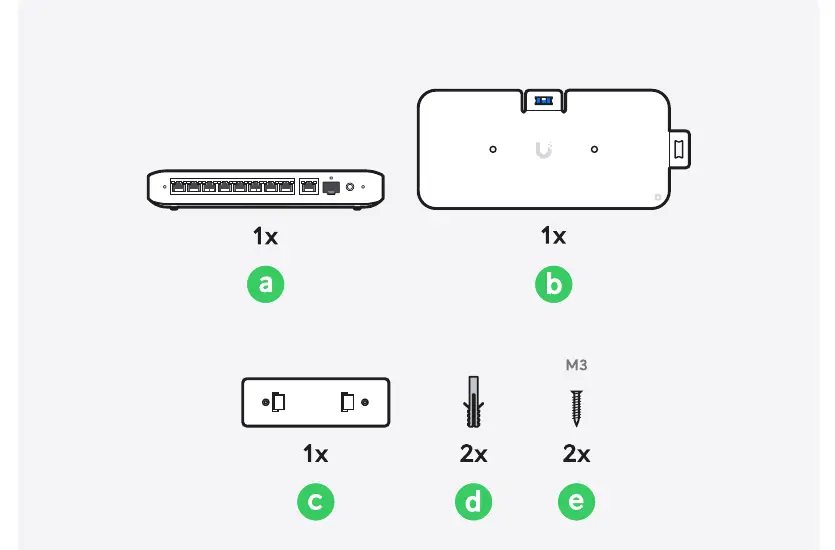
- a: Flex 2.5G 8 PoE Switch
- b: Mounting bracket
- c: Wall mount template
- d: Wall anchors (2x)
- e: M3 screws (2x)
Installation
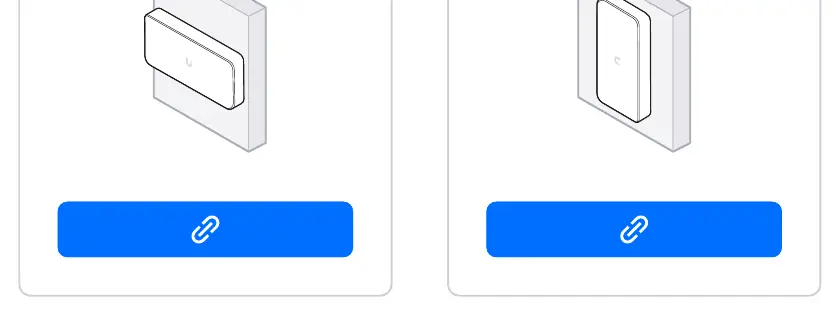
The device can be mounted in various orientations, including horizontal and vertical positions, using the provided mounting bracket and hardware. Ensure the surface is suitable for the wall anchors and screws provided.
Practical help
Before use
- Verify all package contents are present (Switch, bracket, template, anchors, screws).
- Ensure the mounting surface is suitable for the provided wall anchors.
- Determine the desired orientation (horizontal or vertical) before drilling.
Images and diagrams
- The package contents diagram identifies the switch, mounting bracket, template, and hardware.
- The installation diagrams illustrate mounting the bracket to a wall surface.

Manual page author
Michael Turner
Technical manual editor
Reviews PDF manuals for structure, safety notes, and practical product details so readers can find the right information quickly.